Project Charging Levels
Managing projects involves planning and managing activity work breakdown structures (WBSs) to ensure the successful, timely completion of projects. Project accounting involves tracking project costs against the cost breakdown structure, which is represented by project ChartFields. The level of WBS detail that you use for planning and managing projects might not be the appropriate level for tracking project costs. For example, the project manager might want to plan and track the progress of detailed activities; however, the project accountant might want to track and record costs at an aggregate level.
In PeopleSoft Program Management, you can use different levels of the WBS for project management and accounting by defining the WBS level at which you want to track project budgets, forecasts, and costs. You can specify a project charging level of WBS level 1, level 2, or level 3, and the system restricts charges to summary and detail activities that are in the specified level. You can also specify a project charging level of all detail activities, in which case you can capture costs on detail activities, but not on summary activities—regardless of an activity's WBS level. You can set up a default WBS level by business unit, which users can override when they create projects. WBS levels are defined on the Project Costing Options page.
You can modify a project's charging level from all detail activities to WBS level 1, 2, or 3 for projects that are in a pending processing status. If you change the project charging level to a WBS level, and you previously entered budget transactions against a detail activity that is no longer in the specified charging level, an error message appears, indicating that budget details exist for activities that are outside the project charging level. You cannot finalize a budget plan that has budget transactions for activities that are outside the project charging level.
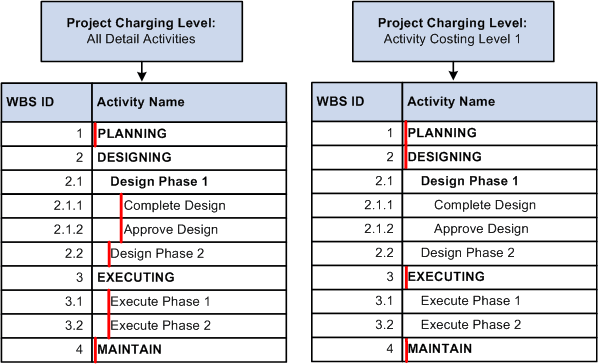
This diagram illustrates the activities that are available for charging based on the project charging level. In each example, the red vertical bars align with the activities to which to you charge:
These two diagrams provide examples of charging at the activity level one and at the activity detail level.