Project Request Approval Workflow
When a project request is submitted for approval, it triggers a business process event that places the work item on the worklist of the person who is identified in the Approver field on the Project Request page. Only users who are associated with the approver role can approve, decline, return, or cost a project request. After the approver performs one of these four actions, the work item is removed from the approver's worklist.
These are the steps that take place during the workflow procedure for project request approvals:
-
A user creates and saves a new project request, but does not submit it.
Based on the initiative type that the user enters on the project request, the project owner and approver fields populate automatically on the project request. The system initially sets the status to pending.
-
The user submits the project for approval by clicking the Submit button on the Project Request page.
The system updates the status to submitted.
-
The system sends the project request to the approver's worklist.
-
The approver views the worklist and clicks the link of the project request to review it.
The project approval page appears.
-
The approver selects one of these options:
Term Definition Approve
Approves (or operationally approves) the project request.
When you select this option, the system responds in one of these ways, depending on whether funding department manager approval is required:
-
If funding department manager approval is required:
The system updates the status to operationally approved, which indicates that the project request is approved from one perspective only. Then, the system routes the project request to the worklist of every manager whose department appears on the Project Request component's Cost page. Assuming each of these managers has adequate spending authority, which is defined in PeopleSoft Approval Workflow Engine (AWE), they all must approve the request for its status to change to approved.
If any one of the funding department managers denies the project request, the system changes the status to declined and does not allow the project request to be resubmitted.
If any of the funding department managers changes the project request status to returned, the system starts the approval process over again, and PeopleSoft AWE routes the project request back to the worklist of the initial requester of the project. The project requester can resubmit a returned project request, however, all of the same approvals are still required, assuming that the amount of the estimated costs does not change enough to cause higher or lower levels of spending authority by the approvers.
-
If funding department manager approval is not required:
The system updates the project request status to approved and either generates a new project with a processing status of active, or, if a project already exists, updates the processing status of the project to active. If any other versions of the project request exist, the system automatically sets them to a status of declined, sets their associated projects to a processing status of inactive, and cancels any labor resource assignments for those projects. The only exception to this occurs when the approver does not have adequate authority to approve the amount of the project request's estimated costs. In this case, PeopleSoft AWE locates the manager of the initial approver and routes the request to the manager for approval.
Note: You establish whether funding department manager approval is required at the installation options level.
See Application Fundamentals: Installation Options - Program Management Page.
Return
Returns the project request to the individual who is identified as the requester on the project request.
The system updates the project request status to returned and adds it to the worklist of the requester for rework. If anyone resubmits the request, the approval process starts over from the beginning.
Decline
Denies the project request.
The system updates the project request's status to declined, changes the processing status of any corresponding projects to inactive (if there is an associated project), and changes any resource assignments for the project to a status of cancelled.
Cost
Indicates detailed cost information is required.
The system routes the project request to the project manager and updates the project request status to Costing.
This value signifies that the project manager must create a detailed plan by using the various project planning tools that are in PeopleSoft Program Management. When the plan is complete, the project manager clicks the Send to Project Request button that is on the Project Request Estimate Summary page. The system subsequently updates the project request status to submitted, triggering a message on the project request to indicate that a detail plan is created, and routes the project request back to the worklist of the project request's designated approver.
-
This diagram illustrates the project request approval workflow, and its impact on the project request status:
After a project request is submitted, it request is added to an approver’s worklist. If the request is approved then the request runs through the approval process. If the request is declined, then the process is ended. If the request is returned, then it is sent to the project manager to be updated. If it requires more detail, such as cost information, then it is sent to the project manager to be updated.
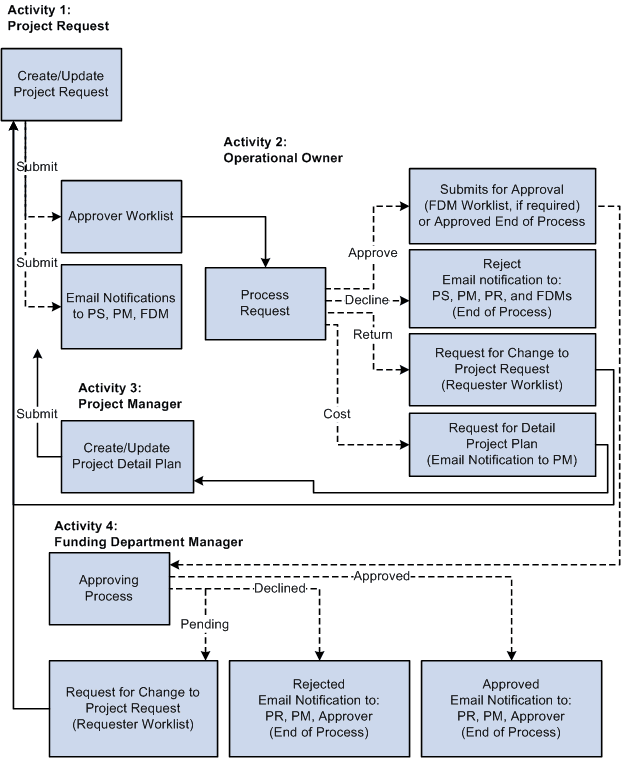
This table provides a key for the abbreviated roles that are in the project request workflow diagram:
| Term | Definition |
|---|---|
|
PS |
Project sponsor |
|
PM |
Project manager |
|
PR |
Project requester |
|
FDM |
Funding department manager |
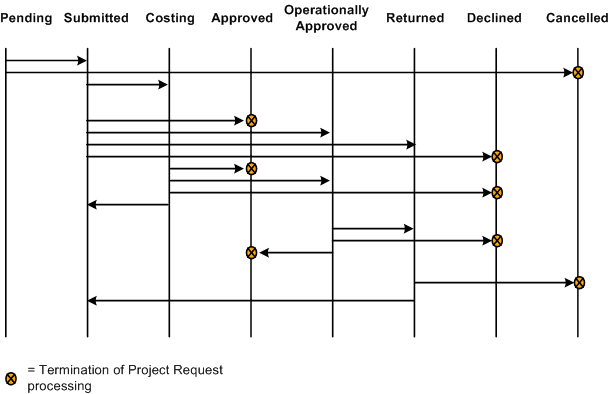
This diagram shows the possible status values that a project request can assume given its current status:
Project request status values include: Pending, Submitted, Costing, Approved, Operationally Approved, Returned, Declined, or Cancelled. Depending on the current status a project request can move forward in the status flow, or return to a previous status.
Note:
Project request functionality is also provided by PeopleSoft Project Portfolio Management, which is part of the PeopleSoft Performance Measurement (PM) product line. If PeopleSoft Project Portfolio Management is installed, project requests must originate in PeopleSoft Project Portfolio Management, rather than PeopleSoft Program Management, and you must use the project request workflow features that are in PeopleSoft Project Portfolio Management.
Note:
Administrators must specify default project statuses for each processing status for projects that are programmatically created by PeopleSoft Project Portfolio Management or PeopleSoft Program Management project requests in an approved status. Otherwise, the approval process for project requests will fail.
See PeopleSoft Project Costing: Project and Processing Statuses.
Related Topics