Resource Status
The Resource Status field on the Resources page enables you to track the life cycle of a resource on a project. This table lists the resource statuses, along with their usages, that can appear on the Resources page:
| Resource Status | Usage |
|---|---|
|
Considered |
Add a named or generic resource to the Resources page, and that resource has one or more assignment schedules. A PeopleSoft Resource Management assignment or allocation has not been initiated for the resource. |
|
Requested |
Manually change the status of a named or generic resource to this status. For PeopleSoft Resource Management-managed resources, this triggers the process of creating PeopleSoft Resource Management assignments for named resources or allocations for generic resources. For generic resources, the system sends a generic resource request to the Pool Manager Workbench. For non-PeopleSoft Resource Management-managed resources, the system changes the status to Committed after you save, but does not create a PeopleSoft Resource Management assignment. The PeopleSoft Resource Management assignment and allocation processes are based on the workflow settings in PeopleSoft Resource Management. If project manager approval is required, the project must have a project manager in Committed status and the resource remains in a requested status until approval is received. For generic resources, if the Pool Manager Approval required option on the Resource Management Options page is selected, the resource status remains as Requested until the pool manager approves the request. If approval is not required, after you change the resource status to Requested, and save the page, the system automatically creates a PeopleSoft Resource Management assignment or allocation and changes the resource status to Committed for named resources and Allocated for generic resources. |
|
Allocated |
This status applies only to generic resources. If you enable generic resource approvals, the resource status changes to Allocated when the pool manager approves the request from the project manager for a generic request. If you do not require generic resource approvals, the system automatically changes the status from Requested to Allocated when you save the page. |
|
Committed |
This status applies only to named resources. If approval is not required, when a named resource status is changed to Requested, for PeopleSoft Resource Management-managed resources, the system automatically creates a PeopleSoft Resource Management assignment and changes the resource status to Committed. If approval is required, the system automatically changes the resource status to Committed when the named resource on the Resources page is approved and a PeopleSoft Resource Management assignment is created. If a named resource is added to the Resources page using the integration with Microsoft Project and approval workflow is disabled, the system automatically assigns a resource status of Committed. A generic resource's status cannot be Committed. A generic resource must be replaced by a named resource before the system can create a PeopleSoft Resource Management assignment and change the resource status to Committed, based on approval workflow. |
|
Cancelled |
You must manually change the status to Cancelled unless you cancel all of the resource's assignment schedules. If you cancel all of the resource's assignment schedules, the system automatically updates the resource status to Cancelled. This list describes the action that the system performs if you cancel an assignment on the Resources page:
|
|
Rejected |
The system automatically changes the resource status to Rejected when an:
|
|
Completed |
This status applies only to named resources who are in a Committed status. You can manually change the resource status from Committed to Completed. You can complete assignments with assignment schedules that are in the past, ongoing, or in the future. The system automatically changes the resource status on the Resources page to Completed if the resource status on all of the resource's assignment schedules for this project is Completed. |
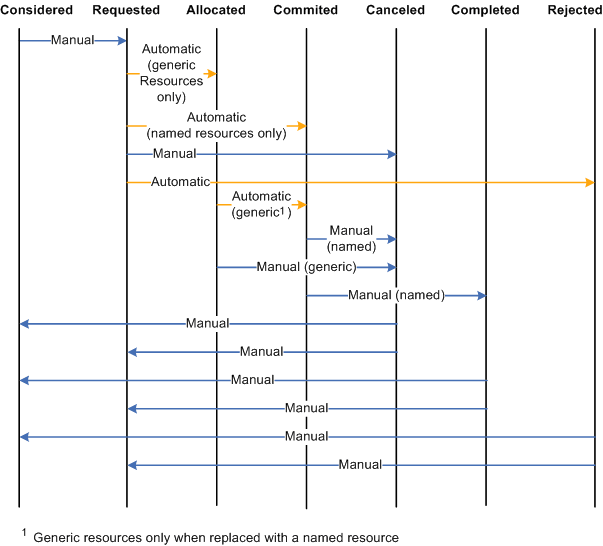
This diagram illustrates the permitted resource status values that you can update on the Resources and Resource Detail pages. In this diagram, Manual indicates that you select the new status in the Resource Status field on the Resources page and Automatic indicates that system processing automatically updates the status. The permitted status changes apply to both named and generic resources unless otherwise noted.
Resource status values include considered, requested, allocated, committed, canceled, completed, and rejected. The resource status can be change manually or automatically by the system.