Integration Process Flow
The integration process flow begins with the creation of a budget in PeopleSoft Project Costing. Project budget rows and actual cost transactions can originate from several sources, such as:
-
Creating a budget plan and details in PeopleSoft Project Costing.
-
Adding actual cost transactions on the Add Transactions page in PeopleSoft Project Costing.
-
Importing budget rows from PeopleSoft Grants.
-
Importing budget rows and actual cost transactions from Microsoft Project.
-
Importing budget rows from PeopleSoft Planning and Budgeting.
-
Running the Funds Distribution process, see Understanding Funds Distribution
For more information about budgeting project costs and revenue, see Understanding Project Cost and Revenue Budgets.
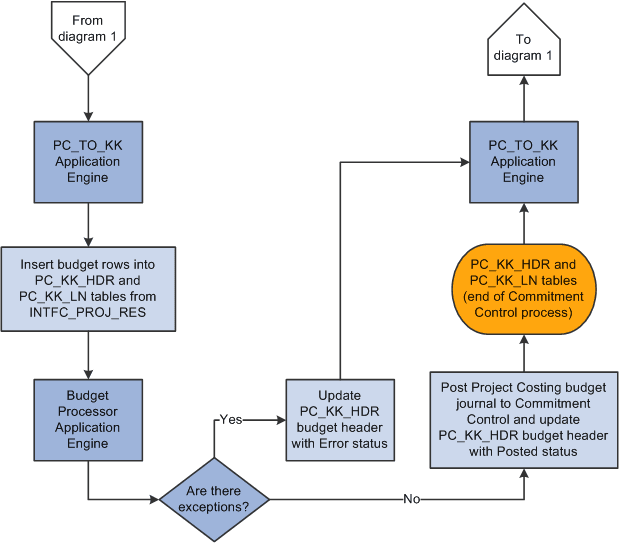
Several different application engine processes play a key role in integrating PeopleSoft Project Costing and Commitment Control. The budget rows in PeopleSoft Project Costing are staged in the project transaction interface table (INTFC_PROJ_RES) until the Load Third-Party Transactions (PC_INTFEDIT) application engine process determines which rows need to be budget checked in Commitment Control. The Load Third-Party Transactions process triggers the Project Costing to Commitment Control Application Engine (PC_TO_KK) process to send budget rows and cost transactions that require budget checking to Commitment Control. The Project Costing to Commitment Control process triggers the Budget Processor (FS_BP) application engine process to budget check the transactions against the Commitment Control budget. If the available budget amount is not sufficient or the transaction receives some other budget-related exception, the budget processor records errors and exceptions are logged in the system. Finally, the Project Costing to Commitment Control process updates the project transaction interface table with the Commitment Control distribution status of error or posted. After the transaction rows successfully post to Commitment Control and the project transaction table, the system deletes the rows from the project transaction interface table.
The following diagram shows the processing flow for the Project Costing to Commitment Control process, part 1:
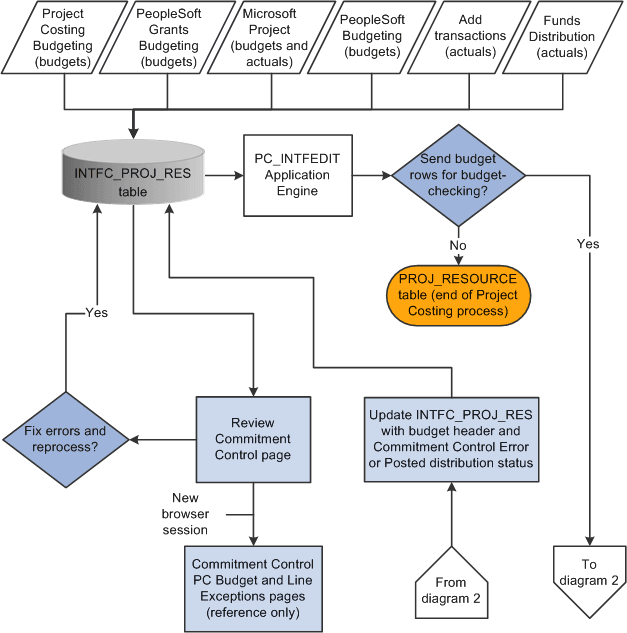
The following diagram shows the processing flow for the Project Costing to Commitment Control process, part 2: