My Projects Transactions Pivot
Use the My Projects Transactions pivot grid (PTPG_PGVIEWER) to view amounts from summary tables. Users can view the amounts at the project, analysis type, and activity level. They can filter based on resource type, category, subcategory, or category and subcategory. The query for this pivot grid selects data for projects listed in a user’s My Projects list. A business unit is required and all project transaction amounts are displayed in the currency of the Project Costing business unit.
The My Projects Transactions pivot grid is based on a query that is using the My Projects transaction list. The list is determined by the user, and the associated transactions from the summary table (PC_SUMMARY) for those projects. This query does not use PROJ_RESOURCE.
This example illustrates the fields and controls on the My Projects Transactions pivot (1 of 3).
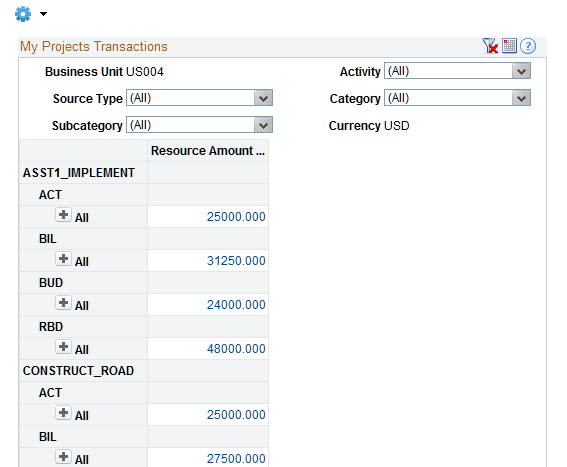
Users can click a link in the Resource Amount column to access the Pivot Grid Drilldown page.
This example illustrates the fields and controls on the My Projects Transactions pivot (2 of 3).
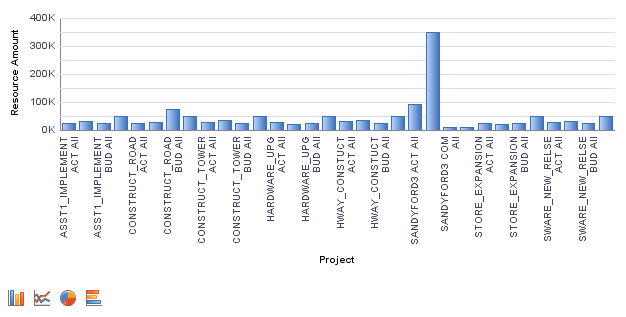
This example illustrates the fields and controls on the My Projects Transactions pivot (3 of 3).
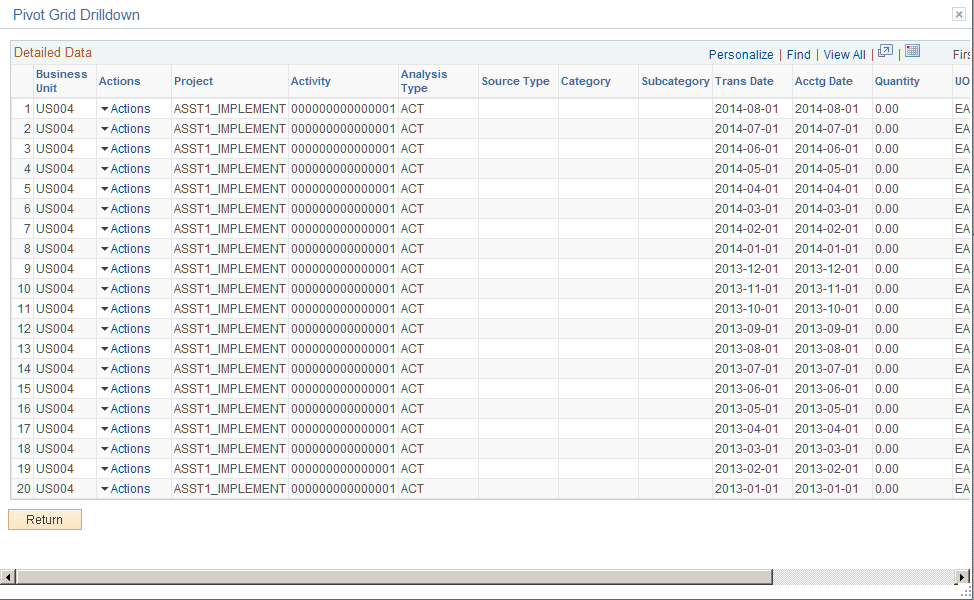
From the Detail view, a user can use the Related Actions drop down option to open the Project Transactions component.
Note:
Transactions that appear in the Project Transactions component are from the PROJ_RESOURCE record, not the summary tables. Therefore, although the amounts should ultimately match, the individual transactions may not match due to the fact that the Pivot Grid and Pivot Grid Drilldown data is coming from the summary table, and may be made up of more than one transaction. All transactions can be viewed in the PROJ_RESOURCE table.