Project and Processing Statuses
Project Costing uses two statuses to convey where a project is in its life cycle—project status and processing status:
-
Status field (PROJECT_STATUS)
This required, user-defined field identifies the conditions that you want to track for projects and activities. The status also defines project events, such as conditional changes that require approval.
You can define status types or use the system-delivered status types.
-
Processing Status field (PROCESSING_STATUS)
This system-defined field is used by the system to restrict incoming transactions. For example, you can charge cost transactions from feeder systems to projects with an active processing status but not to projects with a pending processing status.
Valid processing status values are Pending, Active, Inactive, and Template. You map the user-defined status types to any system-defined processing status except the Template processing status. When you update a project status, the system automatically updates the processing status based on this mapping. You cannot change the processing status of a project directly.
You can map these system-defined processing status types to project status types:
-
Active
-
Pending
-
Inactive
This table lists the status types that Project Costing delivers as sample data and their mappings to processing status types:
| Status Type | Corresponding Processing Status Type | Status Effective Date |
|---|---|---|
|
A (Approved) |
Active |
01/01/1900 |
|
B (Budgeted) |
Pending |
01/01/1900 |
|
C (Closed) |
Inactive |
01/01/1900 |
|
F (Forecasted) |
Pending |
01/01/1900 |
|
H (Hold) |
Pending |
01/01/1900 |
|
I (In Service) |
Active |
01/01/1900 |
|
O (Open) |
Active |
01/01/1900 |
|
P (Proposed) |
Pending |
01/01/1900 |
|
Z (Frozen) |
Inactive |
01/01/1900 |
Every project status must map to a processing status. You can modify project status types and the delivered mappings, but you must not delete or modify the delivered processing statuses.
Status Effective Dates
The status of a project is effective-dated. When you assign a new project status and effective date, the Project - Processing Status Link Application Engine program (PC_STAT_LINK) assigns the corresponding processing status based on the effective-dated mapping that you defined for the project status type.
When you create a new project manually in Project Costing, if the project start date equals or precedes the current date, the system assigns the project status effective date based on the project start date. If the project start date is in the future, the system assigns the project status effective date based on the current date.
You cannot change the project start date to an earlier date if there is no valid project status assigned to the project based on the effective date. In this situation, adjust the project status effective date before you change the project start date.
You can modify the project status on the Project Definitions - General Information page until you save a new project. After that, you must enter a new effective-dated row on the Project Definitions - Status page to change the project status.
Default Project Statuses for Integration with Other Applications
Use the Project Status Defaults page to specify default project statuses for each system-defined processing status for projects that are programmatically created by these applications:
-
PeopleSoft Resource Management.
-
PeopleSoft Contracts.
-
PeopleSoft Grants.
-
PeopleSoft Proposal Management.
-
PeopleSoft Project Portfolio Management (for projects that are created by project requests in a costing or declined status).
-
PeopleSoft Program Management (for projects that are created by project requests in a costing or declined status).
Also use the Project Status Defaults page to specify both default project and processing statuses for projects that are programmatically created by project requests in an approved status in PeopleSoft Project Portfolio Management or PeopleSoft Program Management. Otherwise, the project request approval process fails.
As an example of using default project statuses for integration with other applications, assume that you create a project to model costs for a proposal in PeopleSoft Proposal Management. The system assigns the pending processing status, and assigns the default project status that is set up for pending projects that are created by project requests in PeopleSoft Proposal Management.
To change the project status for a project that is created by PeopleSoft Resource Management, Grants, Proposal Management, Project Portfolio Management, or Program Management, you select a project status that is mapped to a processing status on the Project Status Defaults page.
Process Flow
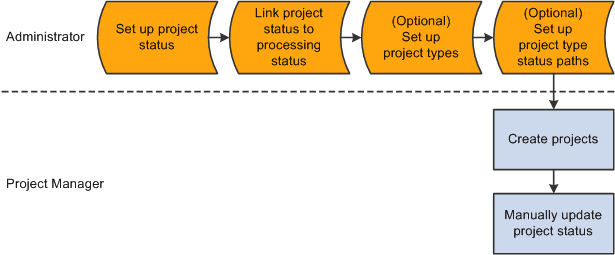
This diagram shows the process flow to set up project and processing statuses and to update a project status:
The diagram illustrates that an administrator sets up project statuses, links the project status to a processing status, optionally sets up project types, and optionally sets up project type status paths. Then a project manager creates projects and manually updates the project status.
After you update the project status, the system:
-
Determines if the corresponding processing status is a valid change based on the previous processing status.
The processing status:
-
Can change from Active to Active.
-
Can change from Active to Inactive.
-
Can change from Inactive to Inactive.
-
Can change from Inactive to Active.
-
Can change from Pending to Pending.
-
Can change from Pending to Active.
-
Can change from Pending to Inactive.
-
Can not change from Active to Pending.
-
Can not change from Inactive to Pending.
-
-
Determines if the project status effective date is current or future-dated.
An Application Engine process monitors project status effective dates and updates the processing status as necessary.
-
Determines if a processing status change is valid.
If the change is not valid, an error message appears.
-
Determines if a project type status map exists for the project type.
If a project type status map exists, the system determines if the project status change is valid based on the project type status path for that project type.
-
Determines if a project event is defined for this project status change.
If a project event is defined, the system triggers approval workflow.
-
Updates project status and processing status.