Rate Plans
A rate plan is a collection of rate sets that the system executes in a specified order. Use rate plans to link rate sets so that priced rows from one rate set are used to create additional priced rows from the next rate set. For example, you can add additional expenses, such as administrative costs or overhead, to cost transactions before they are priced for billing or revenue.
The Pricing process uses the rate plan to determine which rate sets to run and in what sequence to run them. When setting up the rate plan, you can assign rate sets in any combination of rate definition types: billing, costing, cost/billing, and revenue. You can assign the same rate set to multiple rate plans.
Rate plans are similar to rate sets in these ways:
-
Both can be associated with project types, projects, activities, or contract lines.
-
Both are effective-dated.
-
If either a rate set or a rate plan is associated with a project type, it is used as the default rate set or plan for new projects that you create for that type.
-
If either a rate set or a rate plan is associated with a project, it is used as the default rate set or plan for new activities that you create for that project.
This diagram shows the tables that the system uses to process rate plans:
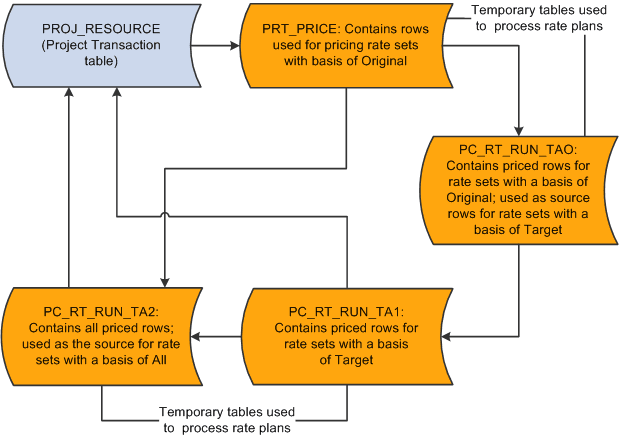
Source rows that enter PeopleSoft Project Costing from feeder systems are stored in a Project Transaction subrecord (PROJ_RES_TMP) and copied into the PRT_PRICE temporary table.
Basis
A basis is assigned to each rate set in a rate plan and tells the Pricing process what transactions to use to create the target rows for a rate set.
Basis options are:
-
Original: The system uses the original source transactions to create target rows for the specified rate set.
-
Target: The system uses the target rows that have been created on this rate plan thus far as the basis for creating the target rows for this rate set.
-
All: The system uses all of the original sources and all of the previously created target rows on the rate plan to create the target rows for this rate set.
Sequence
When transactions come into PeopleSoft Project Costing from PeopleSoft feeder systems, the Pricing process uses the pricing options that you select for the business unit to tell the system what kind of rows to create from the source transactions. The pricing options correspond to the rate definition types (Billing, Cost, Cost/Billing, or Revenue) that are assigned to rate sets. You can process all rate sets on a rate plan even if the rate sets contain different rate definition types, or you can process a subset of rate sets on a rate plan. When the Pricing process runs for a rate plan, the rate sets are processed for the selected pricing options in the sequence that is defined on the rate plan.
For example, assume that you create a rate plan and attach rate sets to the plan in the order of COST1, BILL1, COST2, BILL2, and REV1. When you run the Pricing process for all three pricing options (Cost, Billing, and Revenue), the system first processes the COST1 rate set, followed by BILL1, COST2, BILL2, and REV1. Because of this processing logic, you should add rate sets to rate plans in the order in which you want them to run.
If you run the Pricing process by using the Pricing run control page, you specify the rate sets to process by selecting pricing options (Cost, Billing, and Revenue) on the run control page. The rate sets are processed in the order that is defined on the rate plan, based on the pricing options that you selected on the run control page.
Example of Using Rate Sets and Rate Plans to Price Transactions
This diagram shows an example of pricing inbound transactions from PeopleSoft Expenses to PeopleSoft Project Costing:
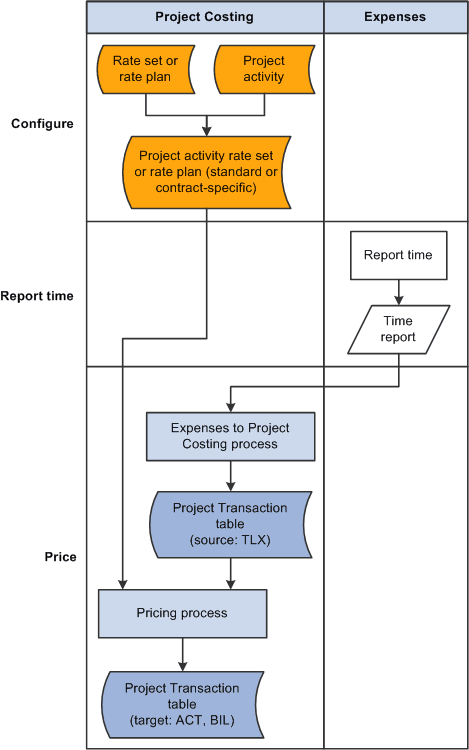
As an example of using rate sets on a rate plan to price incoming transactions from time reports in PeopleSoft Expenses, assume that you set up two rate sets. The first rate set has a cost rate definition type and uses incoming time report transactions (rows with a TLX analysis type) to create actual cost transactions (rows with an ACT analysis type) by using the ECO rate option. The ECO rate option multiplies the source row transaction quantity × the employee-specific cost rate × the target row rate amount.
The second rate set has a billing rate definition type and uses the same incoming time report transactions as source rows to create billing transactions (rows with a BIL analysis type) by using the EBI rate option. The EBI rate option multiplies the source row transaction quantity × the employee-specific bill rate × the target row rate amount.
Now set up a rate plan that contains both rate sets. Both rate sets use the original, incoming time report transactions as source rows. After the rate plan processes the rate sets, the Project Transaction table will contain cost transaction rows with an analysis type of ACT, and billing transaction rows with an analysis type of BIL. The transaction amounts on these rows are based on the rate option on the rate set that was current at the time that you ran the Pricing process.