Transactions in Progress
Projects are made of transactions that are in various stages of the project cycle. Transactions in progress (TIPs) are tracked so that you can see project cost information before it reaches the Project Transaction table (PROJ_RESOURCE). Project managers can identify potential problem areas and see where each part of the project stands in the overall process. TIP information focuses attention on what needs to be resolved to ensure that the project is running smoothly and is not delayed because of a particular problem.
Each PeopleSoft feeder system that has costs associated with a project sends TIP data to PeopleSoft Project Costing by running an Application Engine process that is specific to that feeder system. TIP pages display fields that are associated with PeopleSoft Project Costing, and key fields that are retrieved from primary feeder tables and pooled during the Application Engine process.
This table lists the types of TIPs that PeopleSoft Project Costing delivers:
| PeopleSoft Enterprise Feeder System | Transactions in Progress | Description | Application Engine |
|---|---|---|---|
|
All |
ALLTOPC |
All transactions that have been transmitted to PeopleSoft Project Costing and are either nonbillable or haven't been priced. Transactions are retrieved from the Project Transactions Summary table (PC_SUMMARY_TBL), where the Billing Distribution Status field (BI_DISTRIB_STATUS) equals U or N. |
Online query |
|
PeopleSoft Expenses |
EXTOPC |
PeopleSoft Expenses that are approved but not transmitted (staged) for processing in PeopleSoft Project Costing. Transactions are retrieved from the Expenses Accounting Line table (EX_ACCTG_LINE). |
EX_TIP_LOAD |
|
PeopleSoft Expenses |
TMTOPC |
Time that is approved and staged for processing in PeopleSoft Project Costing. Transactions are retrieved from the Time Staging for Project Resource table (EX_PROJ_RES_STG). |
EX_TIP_LOAD |
|
PeopleSoft Inventory |
INTOPC |
PeopleSoft Inventory costs that are not transmitted to PeopleSoft Project Costing. Transactions are retrieved from the PeopleSoft Inventory Accounting Distribution table (CM_ACCTG_LINE) and the PeopleSoft Inventory Transaction table (TRANSACTION_INV). |
PC_PETIP_SUM |
|
PeopleSoft Payables |
APTOPC |
PeopleSoft Payables expenses that are recorded and not transmitted to PeopleSoft Project Costing. Transactions are retrieved from the PeopleSoft Payables Accounting Entries table (VCHR_ACCTG_LINE) and the PeopleSoft Payables Voucher Header table (VOUCHER). |
PC_PETIP_SUM |
|
PeopleSoft Payables PeopleSoft Contracts (optional) PeopleSoft Grants (optional) |
APNOPY |
Unpaid vouchers that have been distributed to PeopleSoft Project Costing. The GM_METHOD_PAYMENT selection parameter is available only when PeopleSoft Contracts is installed. Otherwise, the query shows all unpaid and partially paid vouchers. Transactions are retrieved from the PeopleSoft Payables Accounting Entries table (VCHR_ACCTG_LINE) and the PeopleSoft Payables Voucher Header table (VOUCHER). |
PC_PETIP_SUM* *This Application Engine also loads Contracts Administration (CA) data when Contracts is installed. |
|
PeopleSoft Contracts PeopleSoft Grants (optional) |
CANOPC |
PeopleSoft Project Costing projects or activities not assigned to a contract line. If you select the Show Project Activities check box (PROJECT_ID_FLG), which appears on the Feeder System Options group of the Transactions in Progress page (Project Costing, Interactive Reports), when you click the Search button, the system will display all of the project activities that are not assigned to a contract line. If you do not select the Show Project Activities check box on the Transactions in Progress page and click the Search button, the system will only display projects that are not assigned to a contract line and will not display their associated activities. |
PC_PETIP_SUM |
|
PeopleSoft General Ledger |
GLTOPC |
Posted Journal transactions that are not transmitted to PeopleSoft Project Costing. This exception condition lists transactions for which the PeopleSoft General Ledger and PeopleSoft Project Costing amounts do not match. Users must review and resolve these issues to enable PROJ_RESOURCE to reconcile with the source system transactions prior to closing the period and prior to closing a project. |
PC_PETIP_SUM |
|
PeopleSoft Purchasing |
POTOPC |
Purchase order costs that are not yet distributed to PeopleSoft Project Costing. Transactions are retrieved from the Purchase Order Line Accounting Entries table (PO_LINE_DISTRIB) and the Purchase Order Header table (PO_HDR). |
PC_PETIP_SUM |
|
PeopleSoft Purchasing |
REQTOPC |
PeopleSoft Purchasing Requisitions that are not distributed to PeopleSoft Project Costing. This exception condition lists requisitions for a project that have not been interfaced to PROJ_RESOURCE for timing reasons or because the PC_PO_to_PC has terminated or ended because of an error. Users must review and resolve these issues to enable PROJ_RESOURCE to reconcile with source system transactions. |
PC_PETIP_SUM |
|
PeopleSoft Purchasing |
UNSREQ |
PeopleSoft Purchasing unsourced requisitions. You must identify and close all unsourced requisitions associated with a project prior to the project being closed. This exception condition lists unsourced requisitions for a project and is run as part of the closeout process. It is included in the closeout reports of some organizations. |
PC_PETIP_SUM |
|
PeopleSoft Billing |
BITOPC |
PeopleSoft Billing invoiced billing lines that are not distributed to PeopleSoft Project Costing. |
PC_PETIP_SUM |
|
PeopleSoft Receivables |
ARTOPC |
PeopleSoft Receivables expenses that are recorded and not transmitted to PeopleSoft Project Costing. |
PC_PETIP_SUM |
|
PeopleSoft Project Costing |
BDTOPC |
Budgets in progress Unposted project budgets: When a new project budget is added to the Project Budgets pages, you must finalize it before spending can begin. You can review project budget details in the Project Budgets and Project Budget Inquiry pages. You must review every project to identify those project budgets that have not been finalized. This exception condition is usually run as part of the project setup validation process, and is run on a weekly or monthly basis. BD_HDR_STATUS <> 'P' Posted project budgets not distributed to Commitment Control: When a new project budget is added to the Project Budget pages, you must finalize it, which posts it to PeopleSoft Commitment Control. You can review project budgets posted to PeopleSoft Commitment Control in the Project Budgets page. You must review every project to identify any project budgets that were not posted to PeopleSoft Commitment Control. Issues with the Projects to Commitment Control Application Engine process (PC_WRAPPER) can prevent the posting of finalized budgets to PeopleSoft Commitment Control. No delivered exception inquiry page or report displays all budgets that meet this exception condition. This exception condition is usually run as part of the project setup validation process, and is run on a weekly, monthly, or ad hoc basis. A.KK_DISTRIB_STATUS <> 'D' Posted project budgets that are not distributed to projects (PROJ_RESOURCE): When a new project budget is added to the Project Budget pages, you must finalize it, which posts it to PROJ_RESOURCE. You can review project budgets posted to PROJ_RESOURCE on the Project Budgets and Project Budget Inquiry pages. You must review every project to identify those project budgets that have not been posted to PROJ_RESOURCE. Issues with the Projects Interface Edit process (PC_INTFEDIT) can result in the finalized budgets not being posted to PROJ_RESOURCE. No delivered exception inquiry page or report displays project budgets that have not been posted to PROJ_RESOURCE. This exception condition is usually run as part of the project setup validation process, and is run on a weekly or monthly basis. PC_DISTRIB_STATUS <> 'D' |
PC_PETIP_SUM |
|
PeopleSoft Grants |
FATOPC |
PeopleSoft Grants F & A transactions in progress This exception condition lists all transactions that are eligible for F&A (Facilities and Administrative) costs that have not been calculated. This could be caused by timing issues, such as the GM_GMFACS process terminating or ending in error in the nightly batch process. You must ensure that F & A is calculated on all eligible transactions for the system to bill it to the sponsor to maximize the organization's cash flow. FA Error Interactive Report: If the GM_GMFACS process terminates or ends in error, you can access the FA Error Interactive Report (GM_FA_INQ) page from the Facilities and Administrative Inquiry group box. |
PC_PETIP_SUM |
Using the Transactions in Progress Summary (PC_PETIP_SUM) Application Engine Batch Process
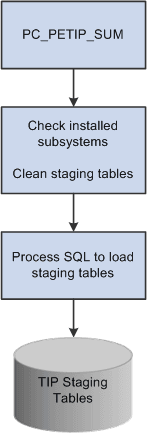
The Transaction in Progress Summary (PC_PETIP_SUM) application engine evaluates the line records of PeopleSoft products with which PeopleSoft Project Costing integrates, such as PeopleSoft Purchasing, Payables, Inventory, Expenses, and so on, and refreshes the transaction data into PeopleSoft Project Costing transaction summary tables. Transactions in Progress pages use this data to display the transaction status. You can schedule this process to run automatically as often as needed based on your business processes.
When querying large tables, the Transactions in Progress Summary (PC_PETIP_SUM) application engine enables you to run a batch process to load the transaction in progress data coming from the feeder systems (AP, GL, AR, INV, PO, BI, GM). Running this process decreases the amount of time required to load the transactions in progress from the feeder systems to the TIP staging tables and display them in the PeopleSoft Project Costing Transaction in Progress page .
The PC_PETIP_SUM (Transactions in Progress Summary) application engine loads feeder system transactions using the online transaction in progress criteria. After the Transactions in Progress Summary application engine runs, the staging tables are populated, which enables you to search for and display the transactions in progress on the Transactions in Progress page in PeopleSoft Project Costing. You can load the transactions for one or all feeder systems on the Run Control page.
This diagram shows the Transactions in Progress Summary batch process flow.
Note:
The PeopleSoft Expenses Transaction in Progress Loader application engine (EX_TIP_LOAD) enables you to run a batch process to load a large amount of PeopleSoft Expenses transaction in progress data from PeopleSoft Expenses. See PeopleSoft Financials, ESA, ALM, and SCM Portal Packs: Understanding Transactions in Progress