Variance Pricing Process Flow
After a contract has been activated and transactions have been processed, any rate changes that occur over the life of the contract can be applied using the Variance Pricing feature.
This feature enables you to apply rate changes as needed by performing the steps described in this process flow diagram:
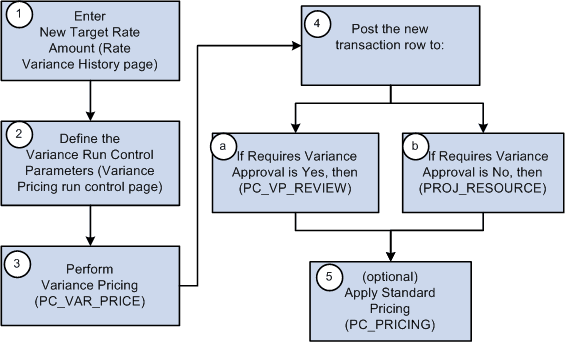
These steps illustrate a high level example of using variance pricing to distribute transactions at a new rate that you previously distributed at a different rate:
-
Access the active rate set to enter the new rates for the target definition.
Variance rates are generally applied retroactively, over a specified period of time. When accessing the rate set, you must use Correction mode to open the page for the appropriate effective date. To access the Rate Variance History page, navigate to the Target page and enter the new rates for the target definition. Variance rates are tracked and processed using the Rate Variance History page.
-
Define the variance pricing run control parameters.
The Variance Pricing process selects the data to process based on the criteria that you specify on the Variance Pricing run control page such as business unit, project ID, activity, ID, accounting or transaction date range, contract information, rate set, rate plan, and rate category.
The Variance Pricing process applies this logic:
-
Selects rate sets based on the parameters specified on the Variance Pricing run control page.
-
Selects active contracts and projects associated with the rate set specified on the Variance Pricing run control page.
-
Projects associated with the rate set must be active, and contracts associated with the rate set cannot have a closed processing status.
-
-
Perform variance pricing.
The Variance Pricing process performs these steps:
-
Selects the eligible transactions that match the effective date and source criteria for the rate set.
Eligible transactions include transaction rows that are not eligible for repricing and have a general ledger distribution status (GL_DISTRIB_STATUS) of G (generated) or D (distributed), a billing distribution status (BI_DISTRIB_STATUS) of W (worksheet) or D (distributed), and do not have a system source of PRR (priced for revenue) or PRP (priced for billing). Transactions with an asset management distribution status (AM_DISTRIB_STATUS) of D (distributed) and transactions with a contracts fee status (CA_FEE_STATUS) of 1 (one), where the transaction has been used for billing or revenue fee calculations for cost-plus contract lines, are also eligible for variance pricing, whether or not the actual transaction has been billed or posted to the general ledger for revenue recognition.
-
Calculates the difference between the old rate and the new rate using this equation:
Variance Amount = (original source) x (new rate) – (original source) x (old rate). This amount may be positive or negative.
-
Creates the new transaction rows for the difference and posts them to the Project Transaction table (PROJ_RESOURCE).
The new transaction rows are assigned the analysis type assigned to the original target row, stamped with a system source of PRV (variance pricing), assigned a cost, revenue, and billing distribution status of N to enable cost stacking, billing, and revenue recognition to occur for the new transactions, and assigned a general ledger distribution status of C. The accounting date is specified on the run control page and the transaction date is stamped with the source transaction date.
-
-
After the variance pricing process is complete, the system posts the new transaction rows one of two locations:
-
If the Requires Variance Approval check box is selected on the Variance Pricing run control page, then the new transaction rows are posted to a staging table (PC_VP_REVIEW). You must access the Variance Pricing Review page to approve or delete transaction rows prior to sending the approved rows to the Project Transaction table (PROJ_RESOURCE).
-
If the Requires Variance Approval check box is not selected on the Variance Pricing run control page, then the new transaction rows are posted to the Project Transaction table (PROJ_RESOUCE).
-
-
(Optional) Applies standard pricing.
Based on the run control parameters, the Variance Pricing process calls the Pricing engine (PC_PRICING) to apply the new rate to all transaction rows that have been priced, but have not been billed or booked to the general ledger, or that have not been priced. It also prices any transactions that have not been priced, but are eligible for pricing.
Note:
When you run the variance pricing process, the system automatically excludes contracts with a processing status of Closed. Additionally, rows created as part of the variance pricing process are not eligible for repricing.