Work Order Tasks and Project Activities
Every work order that is associated with a project contains one or more work order tasks. Project activities are used to track the costs of a work order and each work order task. You can create multiple work orders from the same project activity as long as the project is managed in PeopleSoft Project Costing.
You can associate a work order task with only one project and activity. However, you can associate a project activity with many different work orders and work order tasks.
Associate projects and activities with work orders by using one of these methods:
-
Associating work orders in PeopleSoft Maintenance Management with existing projects.
-
Creating work orders from project activities in PeopleSoft Project Costing.
Associating Work Orders in Maintenance Management with Existing Projects
You can associate a work order with a Project Costing-managed project, a work order-managed project, or the default project that you establish during PeopleSoft Maintenance Management implementation. A project must be associated with the work order business unit on the Work Order - Projects Association page to be eligible for work order creation.
You can associate a work order with a Project Costing-managed project when there is a project manager who is engaged in creating and planning the project and its activities before executing work and incurring costs. Associate a work order with a work order-managed project when you want to enable PeopleSoft Project Costing processes to collect, report, track, and account for costs incurred for work orders and work order tasks behind the scenes. For example, if you create a work order to execute preventive maintenance, you can associate the work order with a work order-managed project that you created for that purpose.
If you do not select an activity to associate with the work order task, the system automatically creates a project activity for the work order task so you can account for the work order costs. The activity start and end dates are based on the estimated start and end dates of the work order task.
After you associate a project and activity with a work order, you can change to a different project and activity for the work order if there are no transaction rows on the work order. When you change to a different project and activity, the system does not copy any other information from PeopleSoft Project Costing to the work order, such as activity start date, activity end date, or resources.
Creating Work Orders from Project Activities in PeopleSoft Project Costing
You can create work orders in PeopleSoft Project Costing from active Project Costing-managed project activities by clicking the Create Work Order button on the Activity Definitions - Team page. If PeopleSoft Program Management is installed, click the Create Work Order button on the Resources by Activity page.
This diagram shows the process to create a work order from a project activity.
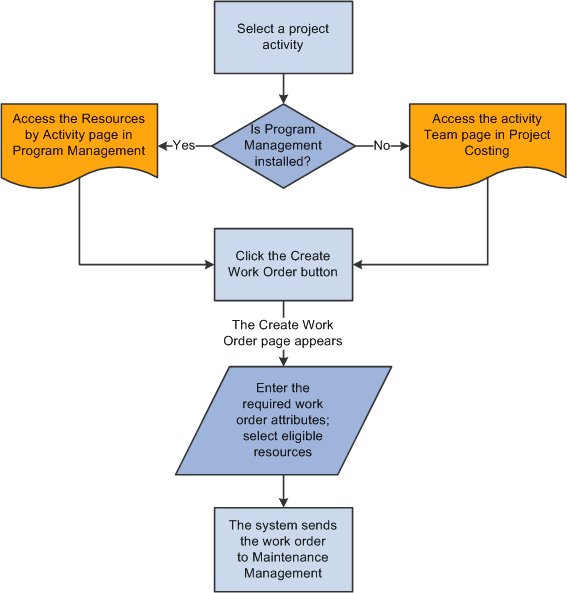
An example of using this method is when an operations or project manager creates a project to build an asset, creates a project activity, and assigns labor, material, or asset tool resources to the activity. The manager can create a work order from PeopleSoft Project Costing to authorize the project team to work on the project.
A work order that you create in PeopleSoft Project Costing is associated with only one project. When you create the work order, the system automatically creates a new work order task, and associates the task with the activity. You can select labor, material, and asset resources on an activity to assign to the work order task. Resources can be associated with multiple work orders for a project activity. Generic labor resources must have a primary craft and be established as eligible resources in PeopleSoft Maintenance Management. Generic material and other resources must have a category.
If you create a work order from a project activity, canceling a work order task does not cancel the associated activity, as other work order tasks may be associated with the activity.
PeopleSoft Project Costing sends labor resources to the work order only if the resource exists in the PeopleSoft Maintenance Management system, and asset resources only if they are tools. All rates that PeopleSoft Project Costing sends to the PeopleSoft Maintenance Management system are converted to the work order business unit base currency.
You cannot create a work order in PeopleSoft Project Costing from a work order-managed project.