Item Ship To Supplier Location Setup
Defining item ship to vendor locations provides the highest degree of control. This location-pricing relationship is specific to the item and ship to location. You can specify a multitude of ship to locations for one item and define different supplier priorities for the same item based on ship to locations. Indeed, this can require a large effort depending on the quantity of items and ship to locations that you have. However, time spent on this one-time setup saves time and repetitive effort in the future.
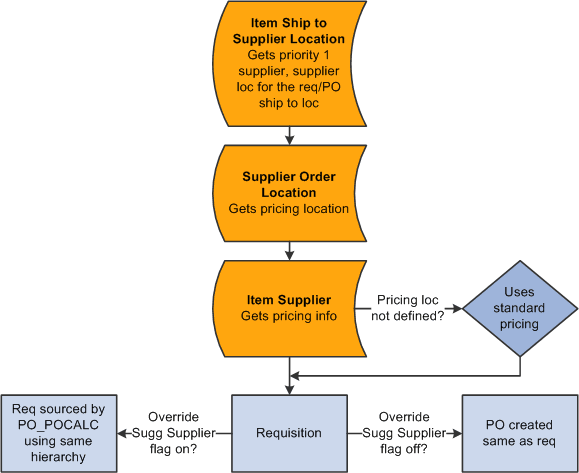
When you create the online requisition or when you source an existing requisition, the system references the item and ship to location of the requisition and accesses the item ship to location to get the priority 1 supplier and its supplier location. The system derives the pricing location that you defined for the Supplier location. It then looks to the item-supplier relationship to access the pricing for the derived pricing location.
This diagram illustrates this default hierarchy:
This diagram illustrates this default hierarchy: