Loading Business Documents into Staging Tables
Use the File Inbound page (EO_FILE_INBOUND) to load business documents into staging tables.
Navigation:
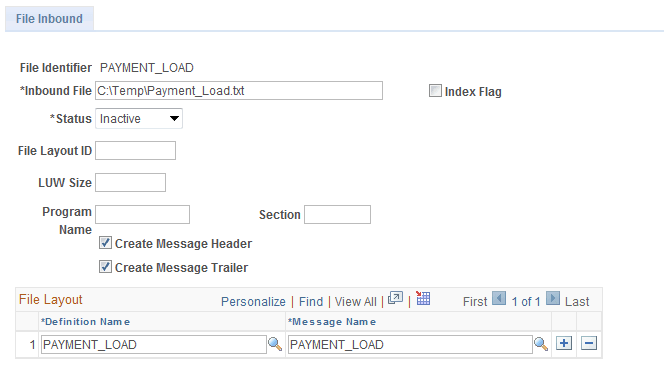
This example illustrates the fields and controls on the File Inbound page. You can find definitions for the fields and controls later on this page.
To set up and use the EDI process:
-
Set up the file identifier to point to a file.
Field or Control Description File Identifier
Displays an identifier pointing to the file.
Inbound File
Enter the path and file name that you want for the inbound flat file when you import into the PeopleSoft Receivables system.
Index Flag
Select only if the inbound file is an index file.
File Layout ID
Enter an ID that identifies the file layout.
LUW Size, Program Name, and Section
Leave blank.
Create Message Header and Create Message Trailer
Deselect these check boxes.
Definition Name
Change the value to PAYMENT_LOAD.
Message Name
Change the value to PAYMENT_LOAD.
-
Enter run parameters on the Inbound File page (EO_FILETOMSG). Navigate to .
Field or Control Description File Identifier
Enter the file identifier that you defined on the File Inbound page.
Index Flag
Select only if the inbound file is an index file.
-
Click Run to run the EOP_PUBLISHF process, which loads data from the file and publishes the data as application messages.
Select the following process name on the Process Scheduler Request page: EOP_PUBLISHF.
-
Use the Process Monitor to verify that the process finished successfully.
-
Verify that the subscriber processed the message and loaded the data into EC tables (Enterprise Components) on the Business Document Detail page (EC_BUSDOC_02).
The value for the EC Completion Status field should be Done.