Multibook Processing
If you select the multibook option on the Installation Options - Overall page, the Receivables Update process creates accounting entries for both the primary ledger and secondary ledgers, including translation ledgers. Each ledger may have a different currency. Secondary ledgers have the same foreign amount currency as the primary ledgers. Translation ledgers create accounting differently than primary and secondary ledgers. When a translation ledger is created, the base currency of the primary ledger becomes the transaction or foreign currency of the translation ledger. This amount is then converted to the base currency of the translation ledger.
Example
Suppose that you enter an item in EUR for a business unit whose base currency is CAD. The base currency for the secondary ledger is EUR. The base currency for the translation ledger is USD. In this case, the process would create entries in these currencies:
| Ledger | Foreign Currency (Transaction Currency) | Base Currency |
|---|---|---|
|
Primary Ledger |
EUR |
CAD |
|
Secondary Ledger |
EUR |
EUR |
|
Translation Ledger |
CAD |
USD |
Note:
Multibook functionality does not apply to direct journal payments. Therefore, secondary lines are not created for direct journals.
Rate Types for Secondary Ledgers
The method that the system uses to obtain the rate type for secondary ledgers varies based on the type of transaction. This table shows how it obtains the rate types for the different types of transactions.
| Transaction Type | Method |
|---|---|
|
Online pending item entry |
The system does the following:
|
|
Payment worksheets |
The system does the following:
|
|
Maintenance worksheets |
The system does the following:
|
|
Transfer worksheets |
The system does the following:
|
|
Customer-initiated drafts |
The system does the following:
|
|
Supplier-initiated drafts |
The system does the following:
|
|
Direct debits |
The system does the following:
|
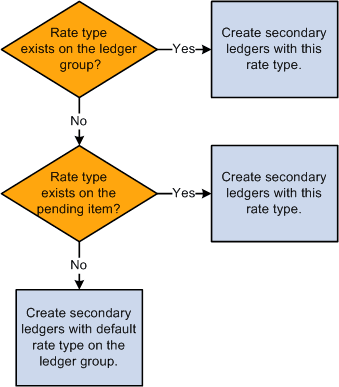
The following flowchart shows how the system obtains the rate type for the secondary ledger entries.
This flowchart shows how the system obtains the rate type for the secondary ledger entries. If the rate type exists in the ledger group, then secondary ledgers are created with that rate type. If the rate type exists in a pending item, then secondary ledgers are created with that rate type. If the rate type does not exist in the ledger group or in the pending item, then secondary ledgers are created with the default rate type of the ledger group.