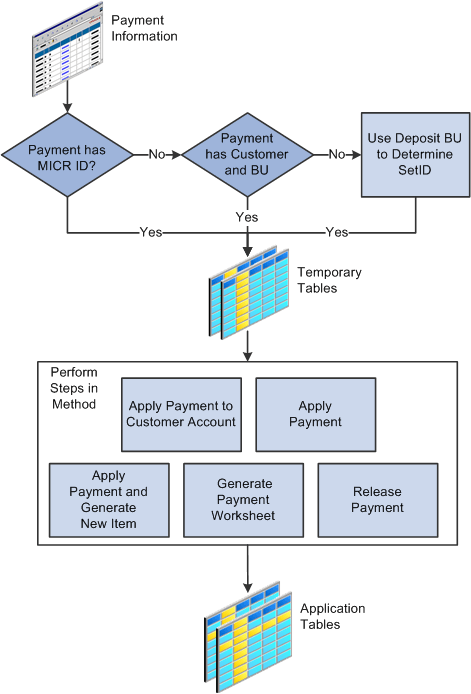
Payment Predictor Process Flow
Payment Predictor processes payments in stages. Before you run the Payment Predictor process, you must establish a hierarchy for processing business units, customers, deposits, and payments. You must also decide which customers or payments to exclude from Payment Predictor.
The source of payments does not matter when you use Payment Predictor. Payments can be online payments that are entered in a regular or express deposit, or they can enter the system through an electronic interface, such as electronic data interchange (EDI), bank statement reconciliation, a lockbox interface, the cash drawer receipts interface (CDR_LOADPMT), or the Excel Edit process.
Each payment must have a Magnetic Ink Character Recognition (MICR ID), customer ID, or some other type of reference information. The system uses the reference information to match payments to customers.
Payment Predictor first looks for the MICR ID. If it finds a valid MICR ID, it moves on to the next stage. If it does not find a valid MICR ID, it then looks for a customer ID with a business unit. If it does not find a valid customer ID with a business unit, then it looks for a customer ID without a business unit and uses the deposit business unit to determine which SetID should identify the customer and the remit from customer.
After Payment Predictor finds and validates the reference information, it stores the results in temporary tables. The temporary tables are used to identify which payment processing method the system uses.
When you set up Payment Predictor, you create a payment predictor method that includes a detailed set of instructions for applying payments. The method also includes instructions for handling payments that cannot be applied, such as placing the payment on the customer's account, generating a payment worksheet so that the payment can be manually applied, or releasing the payment.
After Payment Predictor has completed every step in the method, it moves the payment information from the temporary tables to the application tables.
Note:
If the only reference information is the deposit business unit, you can direct Payment Predictor to apply the payment to a control customer. To do so, create a payment predictor method that contains a step without an identified customer identity and without an instruction to generate an item for a control customer. Assign this method to the deposit business unit.
This flowchart illustrates the Payment Predictor process flow. Starting with the identification of the reference information (MICR ID, customer ID, and more), the Payment Predictor process stores this information to temporary tables, which are used to identify the payment processing method. After Payment Predictor processes the method's steps, it moves the payment information to the application tables.
Payment Predictor process flow: Starting with the identification of the reference information, the Payment Predictor process stores the reference information to temporary tables, which are used to identify the payment processing method. After Payment Predictor processes the method's steps, it moves the payment information to the application tables