Revenue Estimate Processing
The role of PeopleSoft Receivables in the commitment control process is to create source transactions for the revenue entries in the control budgets. A budget in PeopleSoft Receivables is a fixed income allocation (that is, a revenue estimate) with two monetary buckets: a recognized revenue bucket and a collected revenue bucket. Recognized revenue is revenue that has been billed to the customer but for which payment has not yet been received. It is open receivables. Collected revenue is cash that has been received as payment. The combined amounts should eventually match the total estimated amount, which is your budget.
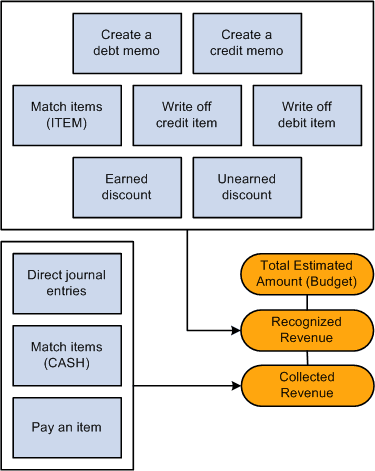
Most receivable functions that you perform update one of the two revenue buckets. In some cases, they update both. This diagram demonstrates that the functions create a debit memo, a credit memo, ITEM match items, a write-off credit item, a write-off debit item, an earned discount, and an unearned discount, all of which update the recognized revenue bucket. Direct journal entries, match cash items, and item payments update the collected revenue bucket.
This diagram demonstrates that the functions create a debit memo, a credit memo, ITEM match items, a write-off credit item, a write-off debit item, an earned discount, and an unearned discount, all of which update the recognized revenue bucket. Direct journal entries, match cash items, and item payments update the collected revenue bucket.
You run the following processes to update the control budgets:
-
The Revenue Estimate process, which creates the source transactions for the control budget ledger for all activity except direct journals.
-
The Budget Processor Application Engine process (FS_BP), which updates the revenue buckets and creates the commitment control budget lines.
The Receivables Update Application Engine process (ARUPDATE) automatically runs the Revenue Estimate process and Budget Processor when it completes if you enabled commitment control for PeopleSoft Receivables. If you have errors in the source transaction or budget checking errors, then you must run the Budget Processor after you correct the errors. If you choose to delete the activity's source transactions, then you must rerun the Revenue Estimate process before you run the Budget Processor again. You only need to rerun these processes if you have corrected errors.
Note:
The Revenue Estimate process does not change the distribution of PeopleSoft Receivables accounting entries in PeopleSoft General Ledger. If you enabled commitment control for PeopleSoft Receivables and for the general ledger business unit associated with the receivables business unit, then you must budget check the entries before you distribute them to PeopleSoft General Ledger.