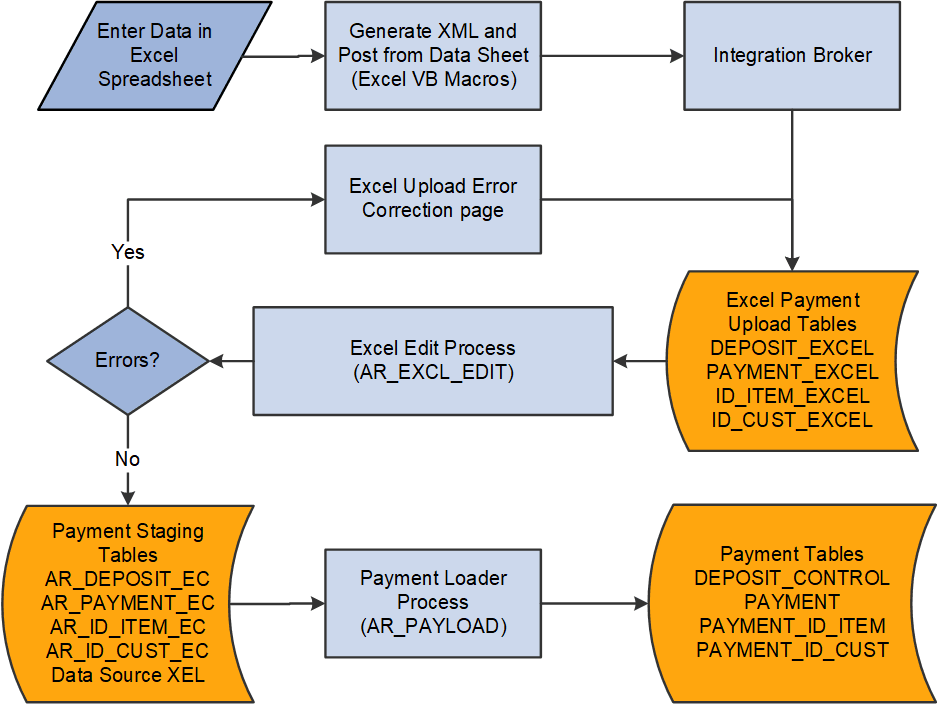
Spreadsheet Payment Upload Process Flow
The Spreadsheet Payment Upload Process flow consists of the following steps:
-
Enter the payment data into the spreadsheet.
Enter data into all of the required fields for a PeopleSoft Receivables payment.
-
Generate XML and post the file from the spreadsheet payment options.
A Visual Basic (VB) macro in the Spreadsheet Payment workbook converts the spreadsheet data into an XML format that the PeopleSoft Integration Broker reads and then posts to a URL available to PeopleSoft systems.
-
Integration Broker processes the incoming XML data and transfers it to the Excel Payment Upload tables on the application server.
-
The Excel Edit process (AR_EXCL_EDIT) validates the data in the Excel Payment Upload tables. Data with errors causes the rejection of the entire payment group. You must correct any errors before the data can be processed successfully. Oracle recommends that you correct the errors online through the Excel Upload Error Correction page. However, you can correct the errors in the Spreadsheet Payment workbook and then regenerate the XML file and post the data again.
-
The Excel Edit process copies the validated payment data into the payment staging tables.
-
Run the Payment Loader process to select the payments based on the process run control parameters and build the PeopleSoft Receivables deposit and payment groups.
All payments in the Excel Payment Upload tables are assigned the value XEL in the DATA_SOURCE field. The Payment Loader process uses the XEL data source value to recognize payments created through the spreadsheet payment upload process.
The following diagram illustrates the flow for processing spreadsheet payments. The data is entered into an Excel spreadsheet and the Excel Visual Basic Macros are run on the data, which is sent to Integration Broker. Integration Broker sends the data to Excel Payment Upload tables. The Excel Edit process is run and, if errors occur, they can be corrected on an Excel Upload Error Correction page. If no errors occur, the payment data is sent to the Payment Staging Tables. The Payment Loader Process (AR_PAYLOAD) runs and the data is updated in the payment tables.
The following diagram illustrates the flow for processing spreadsheet payments. The data is entered into an Excel spreadsheet and the Excel Visual Basic Macros are run on the data, which is sent to Integration Broker. Integration Broker sends the data to Excel Payment Upload tables. The Excel Edit process is run and, if errors occur, they can be corrected on an Excel Upload Error Correction page. If no errors occur, the payment data is sent to the Payment Staging Tables. The Payment Loader Process (AR_PAYLOAD) runs and the data is updated in the payment tables