Data Synchronization with the Employee Source Database
If you maintain employee and non-employee data in PeopleSoft HCM only, the full synchronization process updates the resource setup data in PeopleSoft Resource Management with information from PeopleSoft HCM.
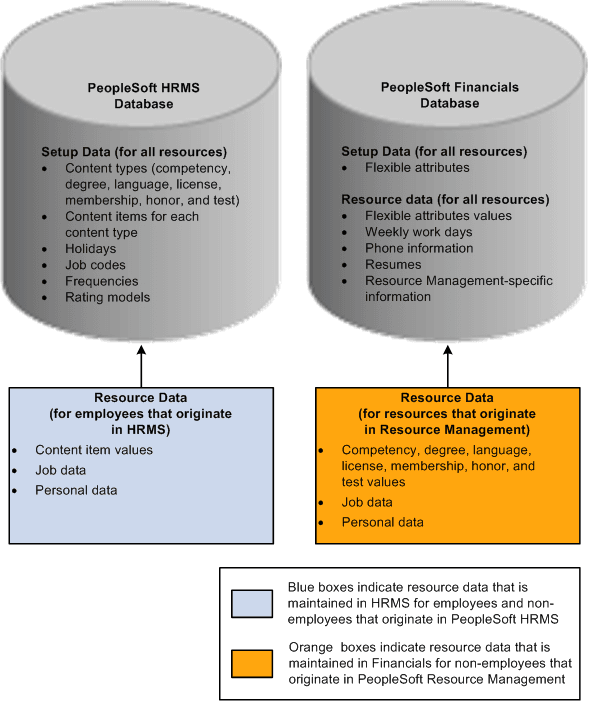
If you maintain non-employees in the HCM and Financials databases, the full synchronization process does not update non-employee data for employee IDs that originate in PeopleSoft Resource Management. In this case, the process updates only employee and non-employee data that originates in PeopleSoft HCM.
This diagram illustrates the source of employee and non-employee data if you maintain non-employees in the HCM and Financials databases:
You can perform these tasks in PeopleSoft Resource Management for all resources:
-
View and modify resource setup data.
For employees and non-employees who originate in PeopleSoft HCM, the system transfers you to the HCM database to modify the data. You can update and save qualification data in the Person Profile component (JPM_PERSON_PROFILE) in the PeopleSoft HCM system and return to the resource profile in PeopleSoft Resource Management.
For non-employees who originate in PeopleSoft Resource Management, you remain in the Financials database to modify the data.
-
Establish resources and maintain eligibility.
-
View and modify Resource Management-specific resource profile data and flexible attribute values.
-
View job and personal data.
For non-employees who originate in PeopleSoft Resource Management, you can modify job and personal data.
Note:
You must use the PeopleSoft HCM system to modify job and personal data for employees and non-employees who originate in PeopleSoft HCM.