Search Framework
Oracle’s search engine is integrated into PeopleSoft applications via the PeopleTools Search Framework. The searches are not performed directly against the database but are performed by the search engine against the indexes stored in the Search Framework server. The indexes are created based on the information contained in PeopleSoft Resource Management. The indexes are not updated online, but through a batch process.
The search is implemented as an Application Class that receives search criteria as input and returns results in the form of resources, orders, and so on, with associated scores.
PeopleSoft Resource Management uses the three types of searches:
-
Express Search
The Express Search enables you to specify resource requirements and search for resources to fulfill those requirements in a single session without a service order.
-
Staffing Workbench
The Staffing Workbench provides both the Fulfill Orders and Manage Utilization search features. This component includes 2 of the 11 search features:
-
Fulfill Orders — find resource to fill service orders
-
Manage Utilization — find open resource requests that fit the skills and interests of eligible resources
-
-
Job Spy and Manage Utilization
This feature helps in finding open resource requests that match your qualifications, preferences, and availability.
Resource Matching uses the Search Framework to quickly calculate qualification and preference scores for each resource. The Search Framework enables PeopleSoft applications to execute free-text data searches.
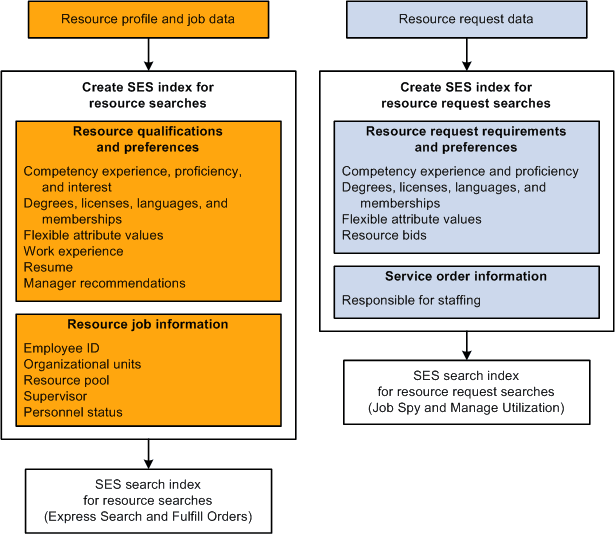
The Search Framework indexing application transforms those files into an index—a Search Framework collection—that is used for searching, as shown in this diagram:
See Setting Up and Maintaining the Search Framework and Resource Matching Cache Tables.