Manage non AWE Transactions Page
Use the Manage non AWE Transactions page (SP_APRR_SRCH_PG) to view and resubmit approved transaction for Timesheets, Progress Logs and Expenses.
Navigation:
Services Procurement, Manage Non-AWE Transactions
This example illustrates the fields and controls on the Manage non AWE Transactions page. You can find definitions for the fields and controls later on this page.
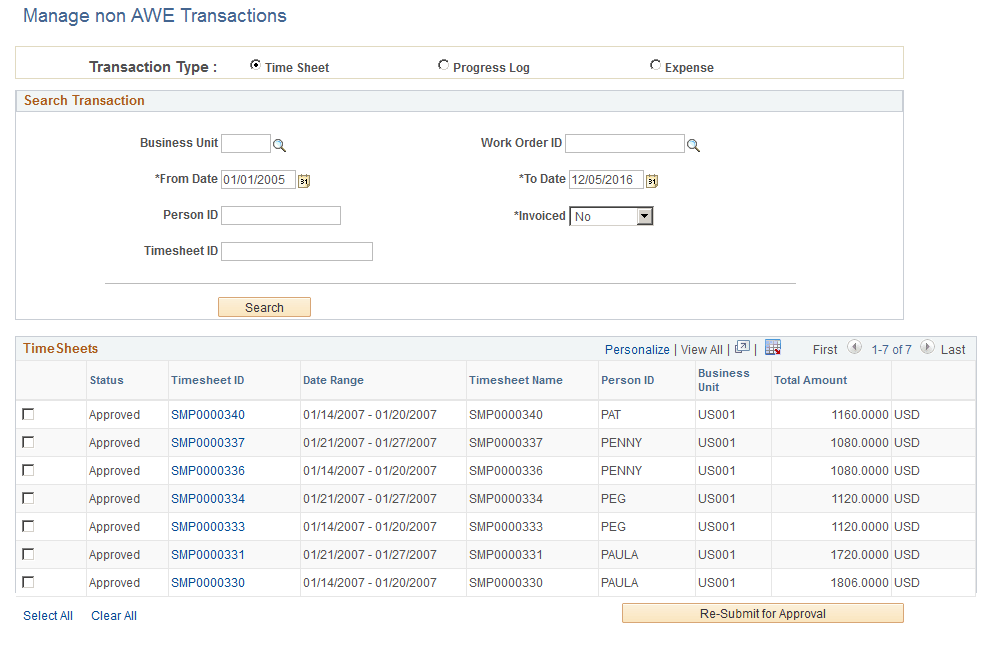
| Field or Control | Description |
|---|---|
|
Transaction Type |
Select a transaction type. The default transaction type is Timesheet. |
|
From Date, To Date |
Select a date range. |
|
Invoiced |
Yes: Select to view invoiced time sheets, expenses, or progress logs. No: Select to view non-invoiced time sheets, expenses, or progress logs. |
Select Search to view the approved transactions. To resubmit for transactions for approval, select the transactions and then select Re-Submit for Approval. Re-submission is possible only for Approved transactions which are not invoiced.