Overdue PO Schedule Analysis Pagelet
The Overdue PO Schedule Analysis pagelet displays a Pivot Grid. This pivot grid is based on a query that displays all overdue purchase order schedules showing the purchase order due date and summarized amount. Overdue purchase order line shipments are overdue when the due date is prior to current date and there remains quantity to be received.
Use the Overdue PO Schedule Analysis pagelet to view overdue purchase order schedules
Navigation:
This example illustrates the fields and controls on the Overdue PO Schedule Analysis.
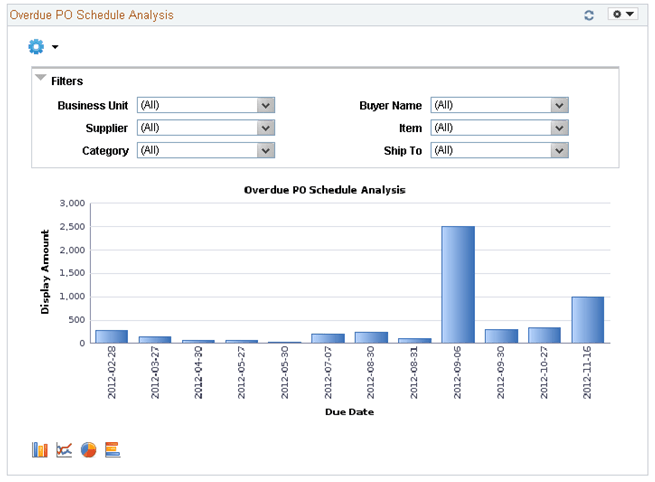
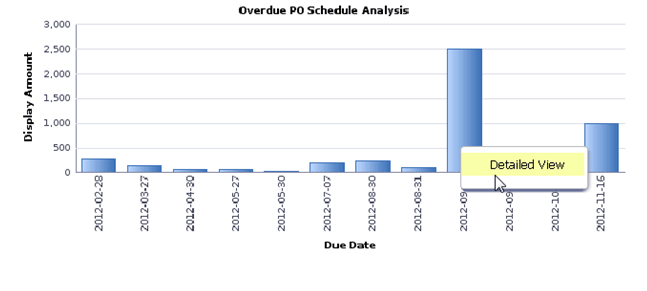
Users can click on a bar on the graph and click on the Detailed View to access the Pivot Grid Drilldown page. The page will help the user to see a list of purchase order details that represent the graph.
This example illustrates the fields and controls on the Overdue PO Schedule Analysis(2 of 4).
From the Detailed View, a user can use the Actions drop down option to view the related actions for the purchase orders.
This example illustrates the fields and controls on the Overdue PO Schedule Analysis (3 of 4).

Users can click on the Add/Update POs and a new window will appear. Related action will take the user to the Add/Update PO component to view additional information about the PO.
Users also have the option to view the data by using the View Grid Page. You can click on the Options menu to access the View Grid Page. The View Grid option enables you to view PO schedule lines based on the Prompt criteria and Data Source Filters in the Pivot Grid
The user can also modify the filters criteria and rearrange the chart view. The View Grid displays the following information:
-
Number of POs – indicates the count of PO schedule lines
-
Display Amount – indicates (price * quantity) of selected PO schedule lines
Users have the option to set the following Prompts to select data into the Pivot Grid:
-
Date Options – Select 1 or 2 weeks of overdue data or select specific dates
-
Display Currency – Select the Currency to display the amount in
-
From Date and To Date range – Select the date range
Users can also narrow the pivot grid data based on these filters: Business Unit, Buyer Name, Supplier, Item, Ship To and category.
This example illustrates the fields and controls on the Overdue PO Schedule Analysis page(4 of 4).
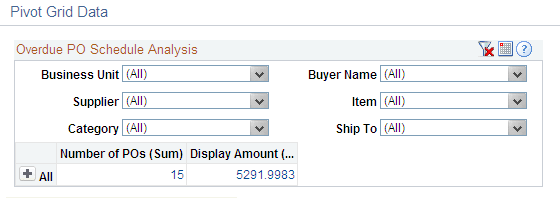
Users can click a link in the Display Amount column to access the Pivot Grid Drilldown page.
Related Topics