PO Spend Analysis As Of Pagelet
The PO Spend pagelet displays a Pivot Grid. The Pivot Grid uses the data created when the Update Spend History is run
For Information on Running the Spend History Process SeeUnderstanding the SRM Dashboard
Use the PO Spend Analysis As Of page to displays purchase order spends as of a specified date in a Pivot Grid.
Navigation:
This example illustrates the fields and controls on the PO Spend Analysis As Of page (1 of 4).
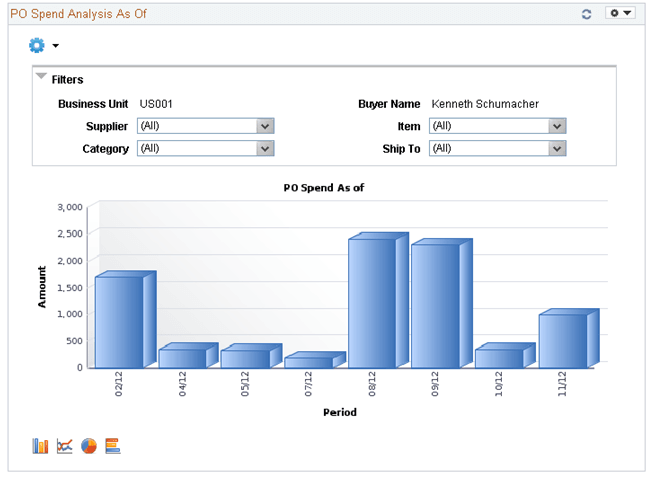
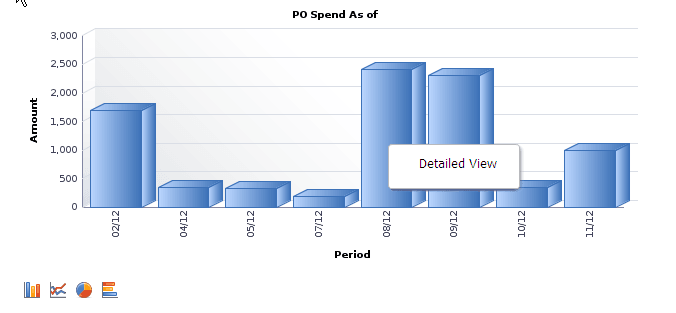
Users can click on a bar on the graph and click on the Detailed View to access the Pivot Grid Drilldown page and see a list of purchase order details that represent the graph.
This example illustrates the fields and controls on the PO Spend Analysis As Of page(2 of 4).
From the Detailed View, a user can use the Actions drop down option to view the related actions for the purchase orders.
This example illustrates the fields and controls on the PO Spend Analysis As Of Page (3 of 4).
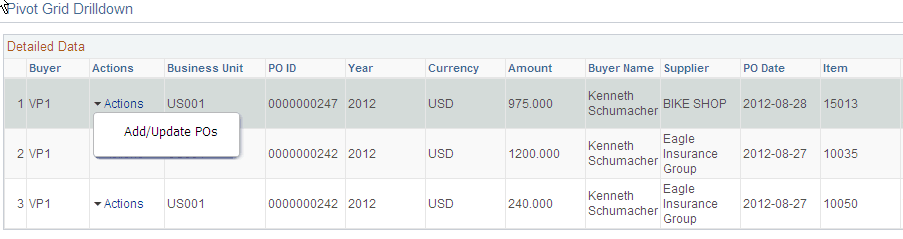
Users can click on the Actions to view the related actions for the PO. The related actions will take you to the Add/Update PO component.
Users also have the option to view the data by using the View Grid Page. You can click on the Options menu to access the View Grid Page.
The View Grid option enables you to view PO schedule lines based on the Prompt criteria and Data Source Filters in the Pivot Grid. The View Grid displays the following information:
Amount (Sum) – indicates (price * quantity) of selected PO schedule lines
Users have the option to set the From Date and To Date range using the Prompt Filter for the View Grid Page. Users can also narrow the pivot grid data based on these filters: Business Unit, Buyer Name, Supplier, Item, Ship To and category.
This example illustrates the fields and controls on the PO Spend Analysis As Of page(4 of 4).
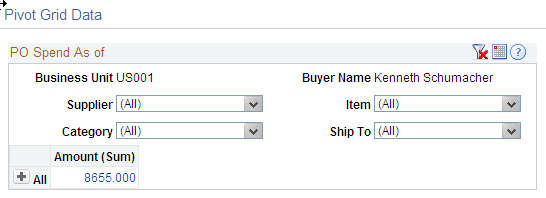
Users can click a link in the Amount (Sum) column to access the Pivot Grid Drilldown page.
For additional information about pivot grids, see: PeopleSoft Application Fundamentals, Using the WorkCenter for Financial and Supply Chain Applications.
See the product documentation for PeopleTools: Pivot Grid