Using the Fluid User Interface for Supplier Administration
This topic discusses how administrators use the supplier administration navigation collection. Fluid Supplier Administration provides you a collection of supplier related components.
Pages Used to view Supplier pages using the Fluid User Interface
| Page Name | Definition Name | Usage |
|---|---|---|
|
Supplier Admin tile |
NA |
Access a collection of supplier related components |
This example illustrates the fields and controls on the Supplier Admin tile. You can find definitions for the fields and controls later on this page.
Click the Supplier Admin tile to access the supplier administration navigation collection.
Supplier Administration page
This example illustrates the fields and controls on the Supplier Administration page.
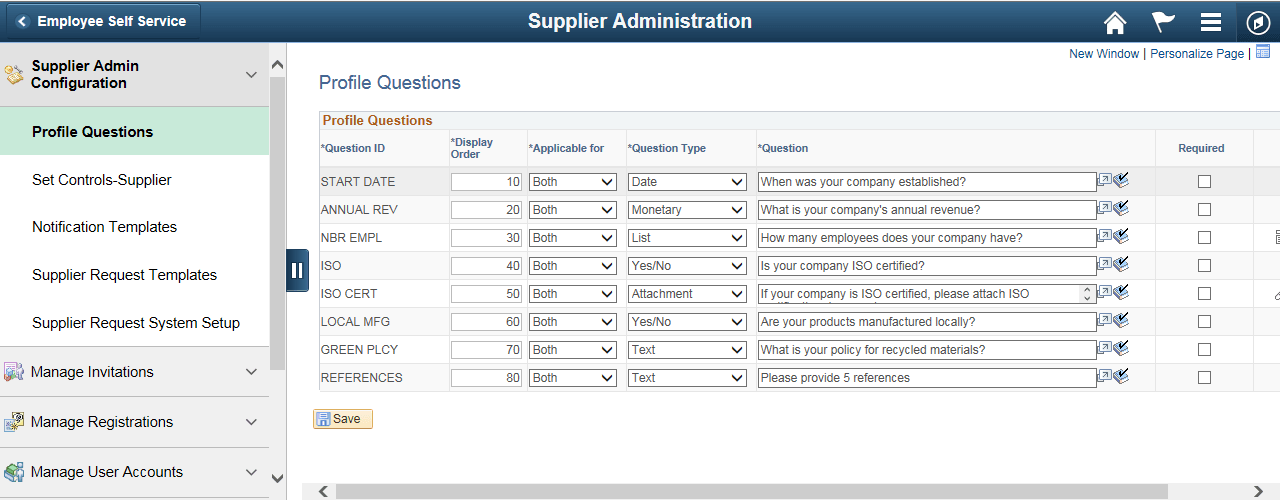
This navigation collection enables administrators to access frequently-used buyer components from one location. The left panel of this page lists the components collected under eleven categories:
-
Supplier Admin Configuration
-
Manage Invitations
-
Manage Registrations
-
Manage User Accounts
-
Maintain Suppliers
-
Supplier Performance Management
-
Supplier Administration Center
The right panel displays the component selected in the left panel.