Using the Incremental Data Publish of Currently Effective Data Process (VENDOR_SYNC_EFF)
| Design Pattern | Message Name | Subscription Name |
|---|---|---|
|
PeopleCode subscribe |
VENDOR_SYNC |
SupplierSyncEff |
|
Full data replication |
VENDOR_SYNC_EFF |
None |
This flowchart illustrates how the Incremental Publish of Currently Effective Data process enables you to publish supplier data incrementally to external systems:
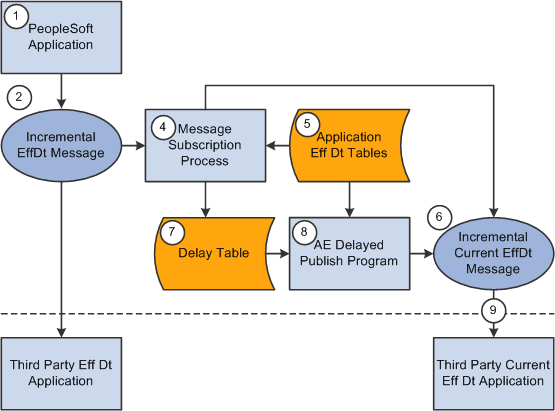
Code for Incremental Publish Process for Currently Effective Data
The following code calls the subscription process:
Declare Function process_effdt_msg PeopleCode FUNCLIB_EOEIP.EFFDT_MSG_PC Field⇒
Formula;
process_effdt_msg("VENDOR_SYNC_EFF", False);
As with the Incremental Publish process, during the save time of this process, the Supplier Information component publishes a VENDOR_SYNC message that contains effective-dated information.
For third parties that can handle effective-dated data, messages are received and processed using the SupplierSync subscription method. For third parties that cannot handle effective-dated data, a subscription process called SupplierSyncEff can be invoked for local publications. It has been set up on the message-generating side, and it makes a call to a shared function.
The common function determines if the data is related to the current effective-dated row and, if so, it copies the data to the VENDOR_SYNC_EFF message and publishes it.
If the data has future effective dates, then the information is written to the Delay table (EO_EFFDELAY). A PeopleSoft Application Engine process publishes the data that resides in delay tables as they become current.
Note:
Third parties that cannot handle effective-dated data can subscribe only to the VENDOR_SYNC_EFF message.
Perform the following steps to run the Effective Date Publish Application Engine process:
-
Define the publish rule for the message on the Full Table Publish Rules page.
-
Create the run control for the Effective Date Publish process on the Effective Date Publish Process page.