Real-Time
This group contains these exceptions:
Overdue Agenda Items
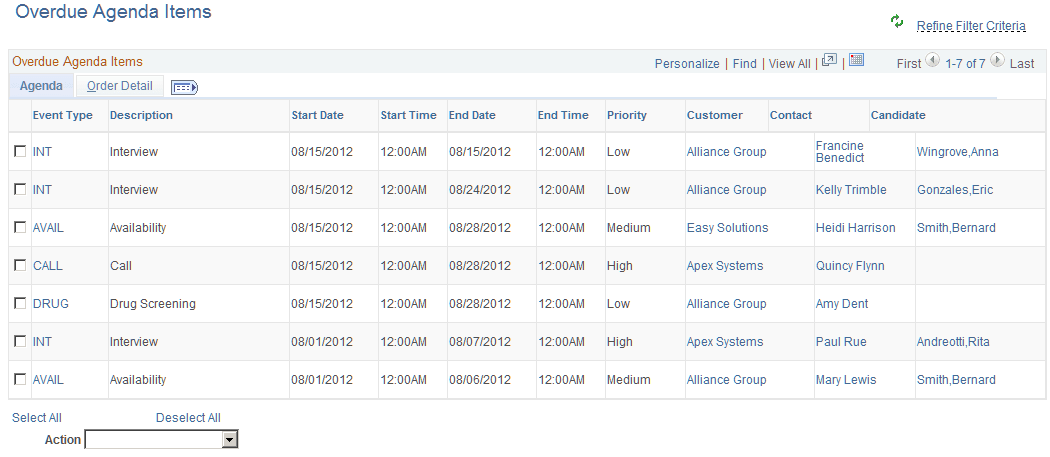
Use the Overdue Agenda Items pagelet (FO_WC_AGENDA) to view all incomplete agendas for the current user. Agenda items are displayed, where the end date is less than or equal to the current date. Users can select a required agenda and perform one of these actions: Change Assigned To, Change Dates, Change Priority, and Mark Items Completed.
This example illustrates the fields and controls on the Overdue Agenda Items Page.
Unfilled Resource Requests
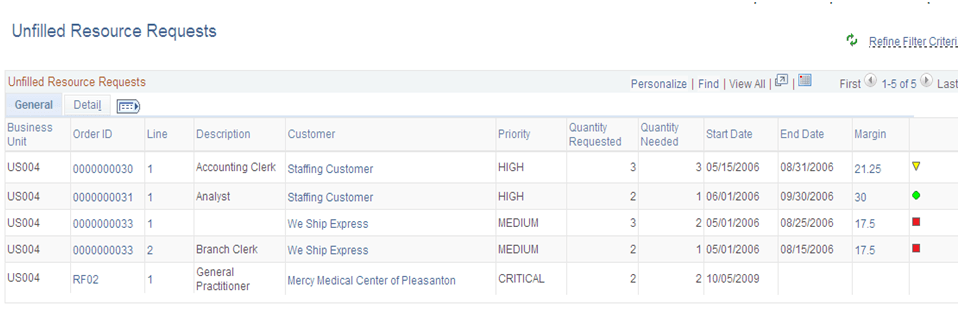
Use the Unfilled Resource Requests pagelet (FO_WC_UNFILL) to view all unfilled resource requests and their respective margins based on certain criteria. An unfilled order is defined as an order or resource request that does not have an assignment, or that all requests do not have assignments.
The criteria is that the requisition status is unfilled on the Resource Request tab, the approval status for the order is approved, the order and resource request status is not Ended, the quantity requested is greater than the quantity assigned, and where the user is the Assigned To on the order, or where the user is the Primary Recruiter of the team, that is entered as the Assigned To.
The system lists the unfilled resource request by priority (high, medium, and low), and then by age (oldest to newest).
This example illustrates the fields and controls on the Unfilled Resource Requests – General Page.
Near Term Assignments
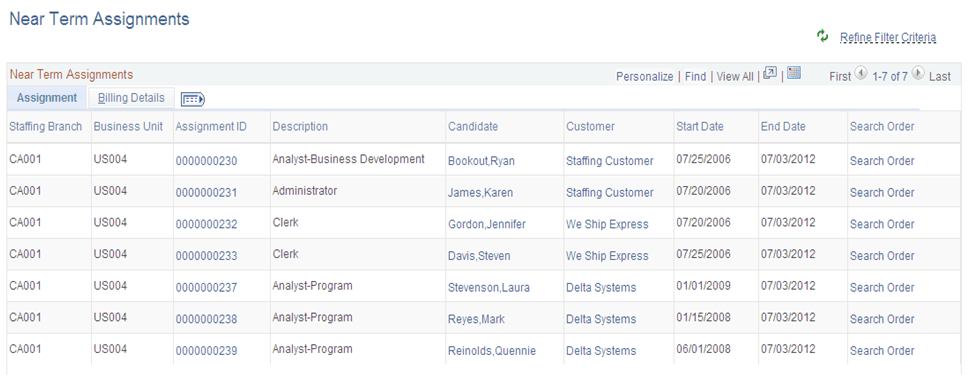
Use the Near Term Assignments pagelet (FO_WC_NASGN) to view all active and temporary assignments where the end date is greater than or equal to the current date. The criterion is all active and temporary assignments. It is possible to have more than one row per resource because you can enter multiple end dates. The end date is defined by the user in the search criteria. The system lists the near term assignments by end date so that the assignments that are due to end first are displayed first.
This example illustrates the fields and controls on the Near Term Assignments Page. You can find definitions for the fields and controls later on this page.