Implementing Metric Measurements with Agreements Steps
Supplier Contract Management metric-based agreements use procurement reporting entities to capture procurement history for each contract. When a contract contains a metric-based agreement, a reporting entry is automatically created that is specific for the contract. To have the system automatically generate the reporting entity, you must:
-
Add an automatic numbering entry for the Contract Reporting Entity ID number type.
This auto numbering setup is required so that the system can automatically create the reporting entity for the contract when you create new contracts that contain metric-related agreements.
To add the entry:
-
Access the Auto Numbering Page.
-
Select Rept. ID from the list of values.
-
Select REPORT_ENTITY in the Field Name field.
The system also populates the Max Length field with 5 as well as other required information. You can add or update start sequences and descriptions for the auto-numbering details.
-
-
Access the PeopleSoft eSupplier Connection: Supplier Performance Setup Page.
-
Select an existing reporting entity in the Reporting Entity ID field.
The system references the reporting entity to obtain the default SetID and calendar information for each new reporting entity that it creates automatically when you add new contracts that contain metric-related agreements.
When the system processes the contract ID, it runs the Procurement History Update process (FS_PRCRUPD). This process includes purchase order receipt information for the contract you specify because the system maintains a link between each contract and the hidden reporting entity for the contract. Use the Update Procurement Info Page to run the process. Next, you can use the PeopleSoft Purchasing: View Supplier Shipment Performance Page to review the performance for a supplier based on one of the metric measurements.
Note:
The Update Procurement Info page in Supplier Contract Management must be used to capture procurement history specific to contracts instead of the version of this component that resides in the PeopleSoft Purchasing Analyze Procurement component.
The Review Agreement Statuses page provides the supplier's Cumulative Performance value and a link to the View Supplier Shipment Performance page.
This example illustrates the fields and controls on the Update Agreement Statuses page.
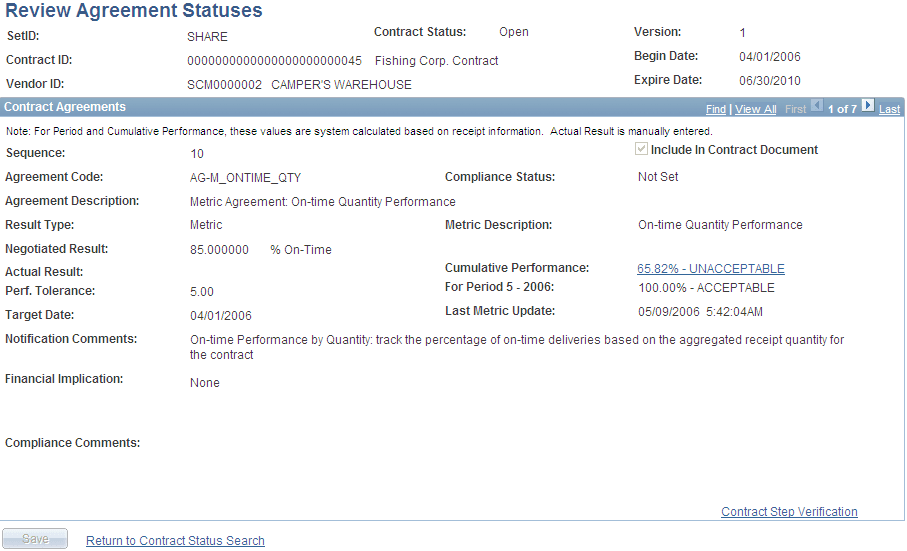
Use this page to view the level of acceptance or noncompliance to the agreement.
| Field or Control | Description |
|---|---|
|
Cumulative Performance |
Click the link value to access the PeopleSoft Purchasing: View Supplier Shipment Performance Page. |
View Supplier Shipment Performance Page
This page shows percentages, time periods, and actual shipment quantity and quality, such as the number of items received and the number rejected. You can review the results of the most up-to-date cumulative performance percentage of metrics against this contract for the current Update Procurement Info run for this contract. For example, if you are tracking quality performance and have established that an acceptable level of returns is five percent, using the PeopleSoft Source to Settle Common Information: Contract Entry - Contract Page, then if 98 percent of the purchase order receipts for this contract have been received without being rejected for quality reasons, after updating procurement history, the View Status Agreements page displays the cumulative performance value of 98% Acceptable.
In addition, you can access details of the underlying performance down to the individual receipt level for purchase orders linked to the contract. When you click the Period / Year link, the Performance Details grid box appears. The Performance Detail grid box provides additional tabs that contain shipping and buyer information. Click the Item ID link to view receipt details for the item.