Supplier Contract Components
You can define supplier contracts as stand-alone, ad hoc documents with document life cycles, or couple them with transactional procurement contracts or purchase orders that you can, optionally, originate from Strategic Sourcing or Purchasing requests for quotes. For transactional contract documents, you can create the document after you create the transactional contract or purchase orders.
Using the transactional system, the Supplier Contract Management application assists in the sourcing bidding process by associating document clauses to bid factors and mapping bid factors to one or more agreements. The application then passes the selected negotiated terms into the awarded contract as agreements. Using Strategic Sourcing, you can include these clauses within the event and Adobe PDF event as the proposals are initially sent to suppliers. When you award the contract, the system uses the clauses from the event for you to include in an authored Microsoft Word contract document.
Using the transactional system, you can also work with the transactional purchasing contract. You access the Purchasing contract from within Supplier Contract Management. You use the Purchasing contract pages to perform purchasing tasks for the contract, such as creating the contract and associating the supplier and maximum amounts, adding line items, and releasing contract quantities.
If you use purchase orders instead of the purchasing contract transaction, you can alternatively author contract documents using the purchase order transaction as the source to link and bind information into an authored contract. You use installation options to enable purchase order contracts, purchasing contracts, or both.
Note:
Supplier Contract Management is not intended to replace the purchase order dispatch process for most purchases; however, in cases where a more formal contract document is required, you can use the supplier contract authoring system to create the document and manage its life cycle including collaboration and creating amendments.
Note:
When you author documents from purchase orders, the system does not include service level agreement integration as it does for transactional contracts.
Along with performing basic contract activities, Supplier Contract Management offers document authoring capabilities and agreements that enable you to create documents using the transactional information as content, or to process rules that control the content for the authored document. For example, when generating an authored document that is linked to a transactional purchasing contract, you can automatically include values for the supplier name, maximum amount, addresses, and item numbers in the Microsoft Word document.
You use the document authoring system to create formatted documents based on purchasing contract information, purchase orders, or you can create ad hoc documents that are not linked to transactions for general use. The system builds both types of documents using PeopleSoft classic desktop browser UI pages. After defining parts or all of a contract, you use the system to generate a document that you can also view and edit in Microsoft Word.
This diagram illustrates the components of the transactional and the document authoring systems that make it possible to create documents:
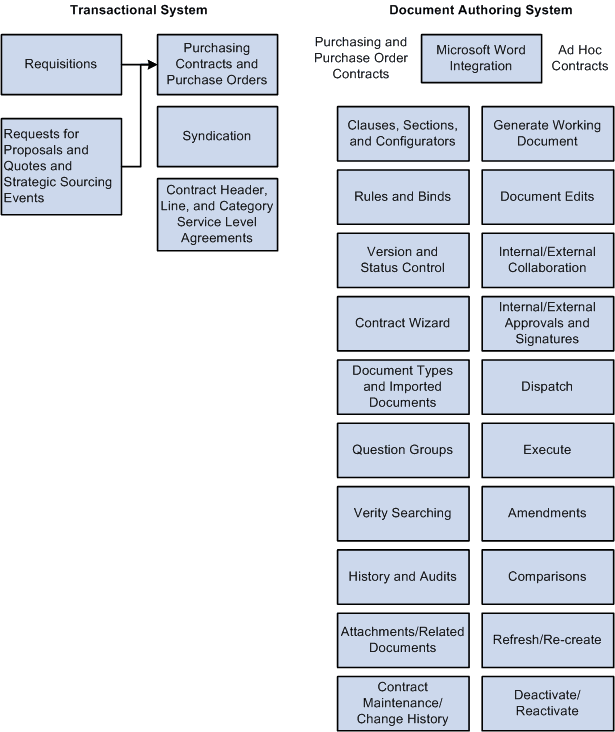
You define the elements of a document using the document library. The library consists of building blocks that work with basic supplier contract setup information. You use these elements as the foundation for document generation.
Note:
Not all of the components that appear below the Document Library box in the previous figure appear on the Manage Contract Library page.
After the system generates a document, the life cycle of the document begins. The actions you take against the document and the events the document goes through make up the document life cycle. These actions include submitting the document for internal and external collaboration, processing approvals, and executing the original contract and any amended versions.