Understanding the Search Types Used in Supplier Contract Management Components
The Supplier Contracts menu has these areas from which you can perform searches:
-
Create Contracts and Document, Document Management.
-
Mange Contract Library.
-
Search Content.
Each area uses one of these types of searches:
-
PeopleTools real-time search.
This type of search is represented by search dialog pages, SQL based where-used search, or both.
-
PeopleSoft Search Framework.
This type of search is based on search indexes that are built at a particular point in time.
This example illustrates the menu options in the Supplier Contract Management menu.
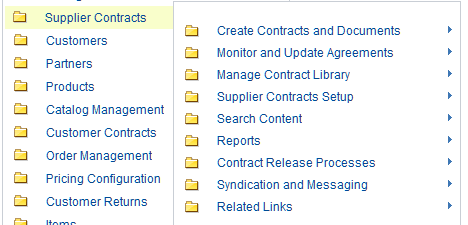
This list highlights the menu options where you can search using PeopleSoft Search Framework:
-
Within the Create Contracts and Documents, Document Management menu option, you can perform real-time and keyword searches.
-
Within the Manage Contract Library, you can perform real-time and keyword searches on the Clauses and Sections menu options.
-
Within the Search Content, Search Content menu option, you can search using PeopleSoft Search Framework and where-used searches.
-
Within the Supplier Contract Workbench, you can search using PeopleSoft Search Framework.