Example 1: Interactive Rate Shopping at Order Entry Time
A user, such as a customer service representative (CSR) can enter a sales order in PeopleSoft Order Management and then shop for freight rates from the external third-party freight system while working with the customer to select the most desired method and cost of shipping. The third-party system responds immediately showing the CSR the freight carriers, amounts, and dates. PeopleSoft Order Entry then allows the CSR to choose one and assign the carrier and freight amounts to the deliveries on the sales order.
Note:
This example assumes that the PeopleSoft system and the third-party freight provider have been properly set up to accomplish this method of freight calculation.
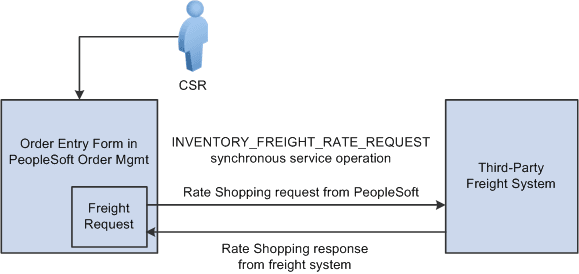
The following diagram illustrates the business process flow of a rate shopping integration using the PeopleSoft external third-party freight feature.
-
The CSR answers the phone and takes the customer's order. The sales order is entered directly into the Order Entry Form component while the customer is on the phone. The CSR saves the component and one or more delivery IDs are automatically created based on the delivery key configuration for the ship-from business unit on the sales order schedules.
-
The CSR requests rate shopping on the Order Entry Form component. The freight request page is displayed, where the CSR can choose the option to shop for rates and preview the freight options available. The Integration Broker uses a synchronous service operation to send out the deliveries to the third-party freight provider. The deliveries created for the sales order are sent out on the freight request transaction.
-
The third-party freight provider responds to the transaction request by returning one or more options for carrier, freight charges, and delivery times.
-
The Freight Rate Shopping page appears for the CSR to view, evaluate, and select the freight option that meets the customer's needs. The CSR is presented with freight options for each delivery assigned to the sales order.
-
The CSR communicates these freight options to the customer, and they both agree on an option. The CSR selects the option, and the carrier and freight amounts are updated on each delivery for the sales order. The appropriate carrier is assigned to the demand lines and the sales order schedule lines, and the communicated ship date from the third-party response is used to set the scheduled ship date on the demand and the order schedules.
Depending on the setting of the Restricted to Order check box for the delivery and depending on the delivery key configuration for the ship-from business unit on the sales order schedules, the sales order demand might be able to be assigned to deliveries that already exist in the system for other sales orders. In addition, the CSR or warehouse personnel could use the Delivery Management Workbench to combine multiple orders into one delivery ID and then initiate rate shopping from the workbench.