Pegging a Material Stock Request
You can peg a material stock request in PeopleSoft Inventory as the demand side of a peg. The stock request could be shipping to a customer, department, or another inventory business unit (demand-side interunit transfer).
This process flow diagram illustrates pegging material stock requests (demand) to an incoming interunit transfers (supply). The sequence of events in the process flow is explained below the diagram:
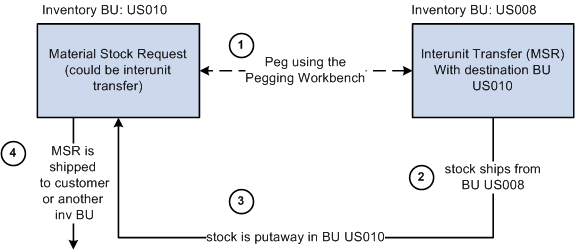
The sequence of events in the process flow when pegging an MSR to another MSR is:
-
Peg is created using the Pegging Workbench. A material stock request or an interunit transfer (demand-side) can be pegged to an interunit transfer (supply-side) with stock arriving in the business unit of the demand-side orders.
-
The supply-side interunit transfer is shipped from the sending business unit.
-
The supply-side interunit transfer is putaway in the destination business unit. During putaway, the stock is soft-reserved or optionally allocated to the outgoing material stock requests based on your setting in the pegging setup pages. In the IN_PEGGING table, if the pegged quantity (QTY_PEGGED field) is equal to the putaway pegged quantity (QTY_COMPLETE field) then the peg status in this table is updated to complete. If either the demand or supply order has no more open peg quantity, then the peg status on the order itself is also updated to complete.
If the notification framework has been defined for the Message Dashboard, then a notification is sent to the owner of the peg when putaway is complete.
-
The material stock request (demand-side) is fulfilled and shipped to the customer, department, or another inventory business unit.
This process flow diagram illustrates pegging material stock requests to a requisition or purchase order. The sequence of events in the process flow is explained below the diagram:
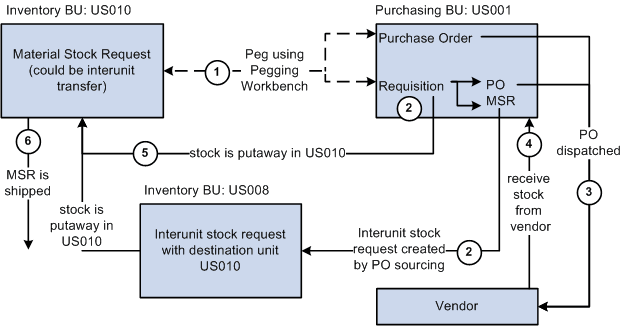
The sequence of events in the process flow when pegging an MSR to a requisition or purchase order is:
-
Peg is created using the Pegging Workbench. A material stock request can be pegged to a requisition or purchase order.
-
The requisition goes through the PO sourcing module and is sourced to an interunit stock request or a purchase order or both. The interunit stock request is created in the sending inventory business unit and is pegged to the MSR.
-
The purchase order is dispatched to the supplier.
-
The supplier ships the stock and it is received into the Purchasing business unit. If the notification framework has been defined for the Message Dashboard, then a notification is sent to the owner of the peg when stock is received into the Purchasing business unit.
-
The stock from the supplier or the sending inventory business unit is putaway in the inventory business unit. During putaway, the stock is soft-reserved or optionally allocated to the outgoing material stock requests based on your setting in the pegging setup pages. In the IN_PEGGING table, if the pegged quantity (QTY_PEGGED field) is equal to the putaway pegged quantity (QTY_COMPLETE field) then the peg status in this table is updated to complete. If either the demand or supply order has no more open peg quantity, then the peg status on the order itself is also updated to complete.
If the notification framework has been defined for the Message Dashboard, then a notification is sent to the owner of the peg when the stock completes putaway in the Inventory business unit.
-
The material stock request (demand-side) is fulfilled and shipped to the customer, department, or another inventory business unit.
This process flow diagram illustrates pegging an MSR to a production ID in PeopleSoft Manufacturing. The sequence of events in the process flow is explained below the diagram:
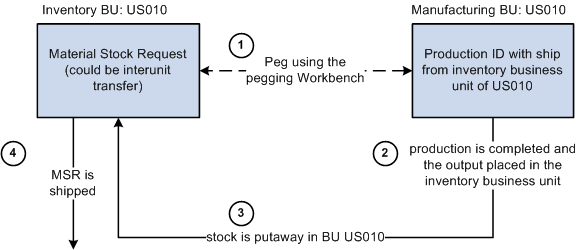
The sequence of events in the process flow when pegging an MSR to a production ID is:
-
Peg is created using the Pegging Workbench. A material stock request (demand) can be pegged to a production ID when the Manufacturing business unit is the same as the Ship From Inventory business unit. You can only peg to the primary output of a production ID.
-
The production is completed and the output placed in the inventory business unit.
-
During putaway, the stock is soft-reserved or optionally allocated to the outgoing material stock requests based on your setting in the pegging setup pages. Once the production order is closed the peg status is changed to complete on both the demand and supply transactions.
If the notification framework has been defined for the Message Dashboard, then a notification is sent to the owner of the peg when the stock completes putaway in the Inventory business unit.
-
The material stock request (demand-side) is fulfilled and shipped to the customer, department, or another inventory business unit.