The Printable Document Object
If you want to add printable version functionality to any other online transaction in the system, then you can leverage the Printable Document Object to assist you with this type of configuration.
To leverage the Printable Document Object within PeopleTools:
-
Add a translate value to the SCM_REP_TYPE field for your report.
This field is a CHAR(4) that contains the list of the valid SCM Reports for use with the SCM Printable Document Framework. These values are shipped for this field:
-
BICR (Billing Cash Receipt)
-
BIDR (Billing Deposit Receipt)
-
OMGR (Order Management Goods Receipt)
-
OMPK (Order Management Pick Plan)
-
-
Once you have added the translate value, you have these two options:
-
Add the SAC_RPT_SUB subpage to your page at Level0.
This subpage contains an HTMLArea (DERIVED_HTML.HTMLAREA) that does not display any information to the user. Instead, this HTMLArea is used to pop up or print your printable document in the background by the Printable Document Framework.
-
If you already have a HTMLArea on your page, you can omit the delivered subpage and simply assign the values returned by the PrintableDocument object properties showHTML or printHTML to the HTMLArea on your page.
-
-
Add PeopleCode to the page to create and display (or directly print) the printable document.
Note:
This PeopleCode can be behind FieldChange on a pushbutton or link, behind RowInit, or anywhere that you can to initiate the Printable Document logic. This code is used for either launching a pop-up window that displays your printable document (showHTML) or for sending your printable document directly to a print dialog (printHTML).
Your PeopleCode must instantiate the PrintableDocument object (SCM_UTILITES:PrintableDocument) to generate a report. This PrintableDocument object accepts a rowset, an XML document, or a HTML string as valid data sources in order to generate a report. If you choose the rowset or XML document data source, then you must populate the XSLDocument property in order to translate the data into HTML for display. This XSLDocument can be populated directly or you can use the Print Document Framework Style Repository using the SetStyle() method to retrieve the report stylesheet. If the report data is already in HTML format, then no translation is needed and the XSLDocument property does not need to be set.
This figure illustrates the Printable Document Object Class:
This example illustrates the fields and controls on the Printable Document Object Class. You can find definitions for the fields and controls later on this page.
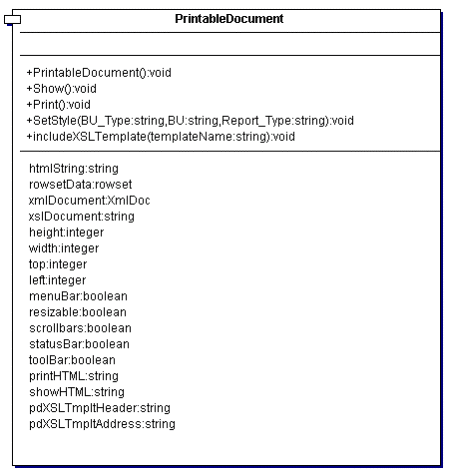
A sample PeopleCode instantiation of the Printable Document Object class might be:
/*Import the Printable Document*/
import SCM_Utilities:PrintableDocument;

/*Instantiate the PrintableDocument Object*/
Local SCM_UTILITIES:PrintableDocument &pDoc;

/*Add code to create a local rowset withthe data needed for printing*/
Local Rowset &rs;
...
&pDoc.RowsetData=&rs;

/*Set the stylesheet*/
&pDoc.SetStyle("OM", "US001", "OMGR");

/*Show the Printable Document*/
&pDoc.Show();