Understanding Tax Integration Technologies
PeopleSoft supports integration with four sales and use tax solutions from two third-party suppliers:
-
Taxware Enterprise
-
Vertex O Series
-
Taxware Sales and Use Tax
-
Vertex Q Series
Web Service Integrations
Taxware Enterprise and Vertex O Series are both implemented as web services. PeopleSoft applications communicate with these web services through the PeopleSoft Integration Broker. The Integration Broker uses the URL of the web service to conduct transactions with these tax solutions.
Business Interlink Integrations
PeopleSoft applications communicate with Taxware Sales and Use Tax and Vertex Q Series through Business Interlink objects and plug-ins. The Business Interlink object is part of the PeopleSoft system, but the Interlink plug-ins and associated integration software are provided by Taxware or Vertex. The plug-in and integration software must be installed on the PeopleSoft application and Process Scheduler servers. Initialization files, the Microsoft Windows Registry, or environment variables are used to store the information needed to connect to the main tax solution software and databases.
Note:
PeopleSoft Business Interlink is a deprecated product. These options currently exist for upgrade compatibility and transition.
The following diagram shows how the PeopleSoft interlink object communicates with the interlink plug-in, which in turn communicates with the tax solution and database through the supplier shared libraries.
The following diagram shows how the PeopleSoft interlink object communicates with the interlink plug-in
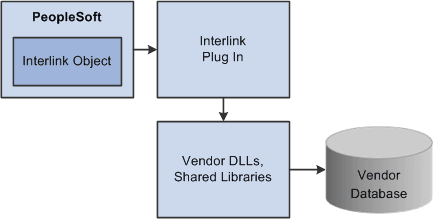
The generic tax supplier dynamic link libraries (DLLs), or shared libraries, are typically delivered by the tax suppliers to all customers. Each supplier has a unique set of DLLs. The tax supplier database objects are the repositories for geocodes, tax rates, exception information, and transactions.
Note:
An Interlink plug-in can also be installed on a Windows client running the PeopleSoft Application Designer to facilitate two-tier testing. Additional supplier-supplied software may be required, as typically only software for the target production operating system is provided.
For technical details about individual EIPs, use the Interactive Services Repository (ISR) in the My Oracle Support website located at https://support.oracle.com/CSP/ui/flash.html.