15.5 Activating the Domain for Asynchronous Messaging
Asynchronous message handling in the PeopleSoft system is different from synchronous message handling. In the asynchronous mode, the system dumps a message into a queue and a message handler picks up the message and gives it to the message dispatcher. The dispatcher then delivers the message to the target node. To enable the message handler and dispatcher, verify that your domain has publish and subscribe servers configured in psadmin.
To enable message handler and dispatcher:
-
Execute the psadmin command.
-
Ensure that your domain has publish/subscribe servers configured in psadmin.
-
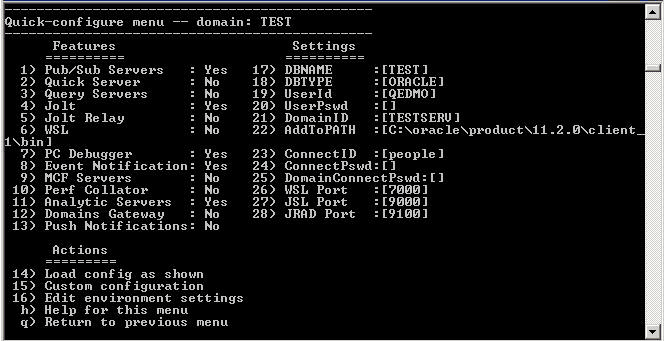
Set Pub/Sub servers to Yes as shown in the following example of the PSADMIN Quick Configure menu:
Figure 15-10 PSADMIN Quick-configure menu
Note:
PSADMIN configuration supports asynchronous messaging. After you start your application server, you see two new processes—one for Message Handler, and one for Message Dispatcher. After you configure your application server, you need to activate your domain through PeopleSoft Pure Internet Architecture, to ensure that the Handler and Dispatcher pick up your asynchronous messages.
Next, activate the local domain.
See the “Appendix: Applying Common Installation Instructions,” Activating the Domain for instructions.
This completes the set up for PeopleSoft Asset Management Physical Inventory Web Services.
See the product documentation for PeopleSoft FSCM: Asset Management, “Performing Asset Physical Inventory,” for more information about the PeopleSoft Asset Management Physical Inventory cycle where you can utilize service operations.