16.3 Configuring the Inbound Nodes
To configure the inbound nodes:
-
Select PeopleTools, Integration Broker, Integration Setup, Node Definitions.
-
On the Nodes search page, search for and select the node name PSFT_XINBND.
-
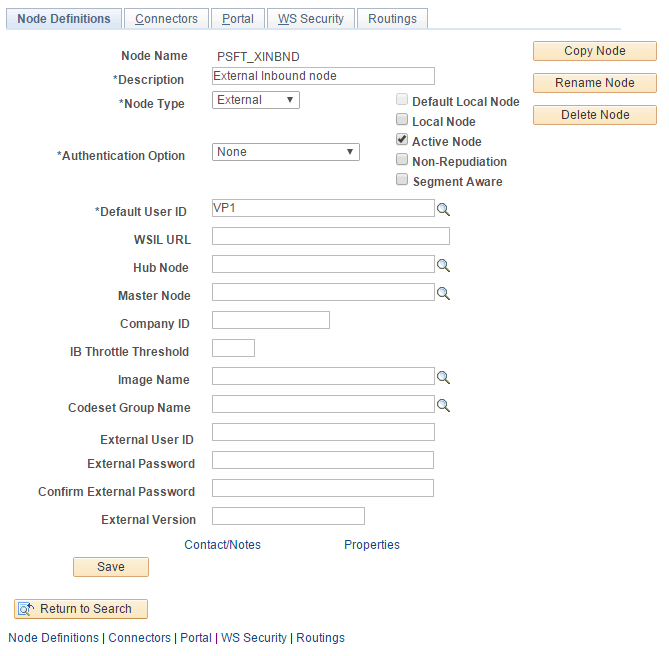
On the Node Definitions page, in the Default User ID field, enter the value for the user that submits the PROCESS_DISCOVERYDATA Service Operation into ITAM for the PSFT_XINBND node, as shown in the following example:
Figure 16-1 Node Definitions page for PSFT_XINBND
-
Click Save.
-
Click Return to Search.
-
On the Nodes search page, search for and select the node name ANONYMOUS.
-
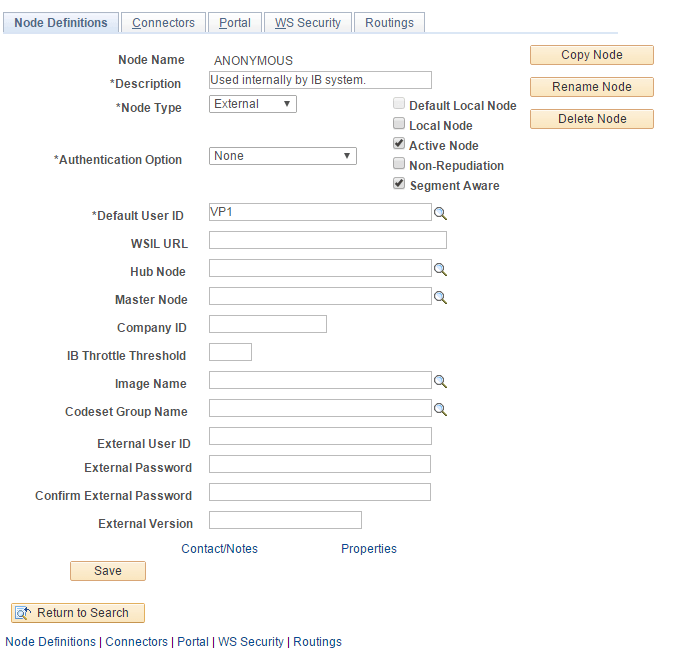
On the Node Definitions page, in the Default User ID field, enter the value for the user that submits the PROCESS_DISCOVERYDATA Service Operation into ITAM for the ANONYMOUS node, as shown in the following example:
Figure 16-2 Node Definitions page for ANONYMOUS
-
Click Save.