4.5 Identifying FSCM Search Definitions for Attachments
This step contains details on FSCM search definitions that can search for attachments.
Search Attachments are documents that can be included in a Search Index. Depending on the application and setup, attachments can be stored on the FTP server, the SFTP server, or in the database. When attachments are to be included in a search index, they must be defined on the Attachment Properties tab of the Search Definition page. You can also find pre-defined attachments on the Search Definition page.
See the product documentation for PeopleTools: PeopleSoft Search Technology for more information on search definitions and attachments.
This table illustrates the Financials and Supply Chain search definitions that can search for attachments, along with the locations where they are used:
| Search Definition | Description | Used In |
|---|---|---|
|
EP_AM_ASSET |
Assets |
Global / Search Pages |
|
EP_AP_VENDOR |
Suppliers |
Global / Search Pages |
|
EP_AP_VOUCHERS |
Vouchers |
Global / Search Pages |
|
EP_CS_DOC_ADHOC |
Ad hoc Documents |
Search Content in Supplier Contract Mgmt |
|
EP_CS_DOC_CONTRACTS |
Contract Documents |
Search Content in Supplier Contract Mgmt |
|
EP_CS_DOC_PURCHORDRS |
Purchase Order Documents |
Search Content in Supplier Contract Mgmt |
|
EP_CS_DOC_SOURCING |
Sourcing Event Documents |
Search Content in Supplier Contract Mgmt |
|
EP_PO_CONTRACTS |
PO Contracts |
Global / Search Pages |
|
EP_PO_PURCHASE_ORDERS |
Purchase Orders |
Global / Search Pages |
|
EP_PO_REQUISITIONS |
Requisitions |
Global / Search Pages |
|
EP_SS_EVENTS |
Sourcing Events |
Global / Search Pages |
|
EP_AR_ITEMS |
AR Items |
Global / Search Pages |
|
EP_AR_PAYMENTS |
AR Payment Search |
Global / Search Pages |
|
EP_AR_PMT_ENTRY |
AR Payment |
Global / Search Pages |
|
EP_BI_BILLING |
Billing |
Global / Search Pages |
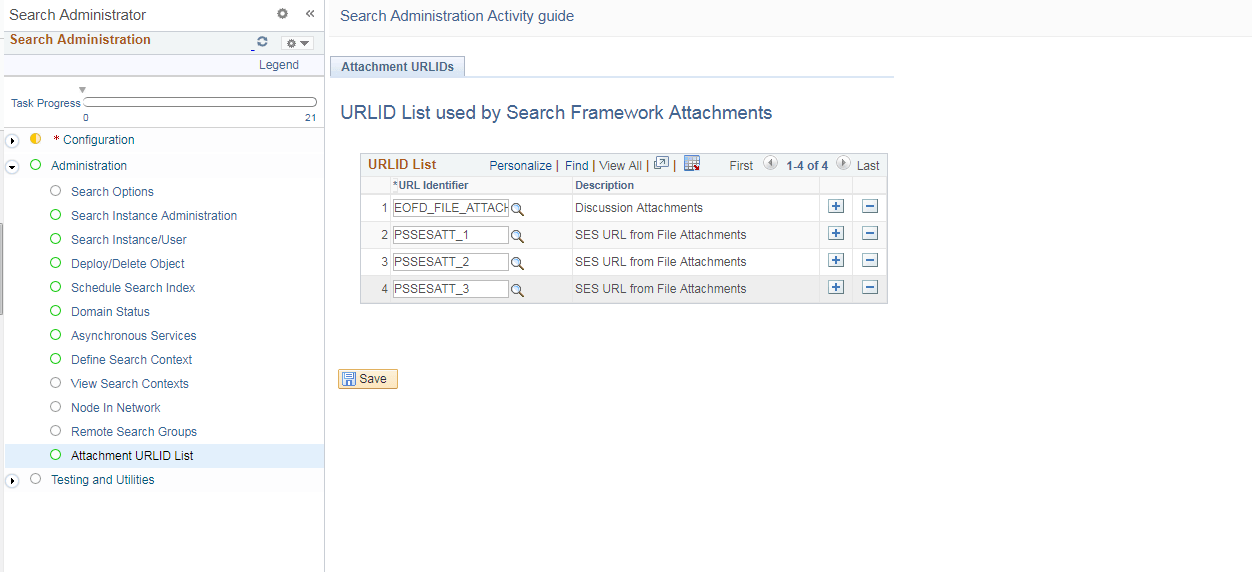
Before indexing, verify that the URLID list is not blank. Attachments will not be indexed if the URLID list is blank.
To verify:
-
Select PeopleTools, Search Framework, Search Admin Activity Guide.
On the Search Administration section, click Administration, and select the Attachment URLID List option to view the Attachments URLIDs page, as shown in the following example:
Figure 4-1 Attachments URLIDs List page
-
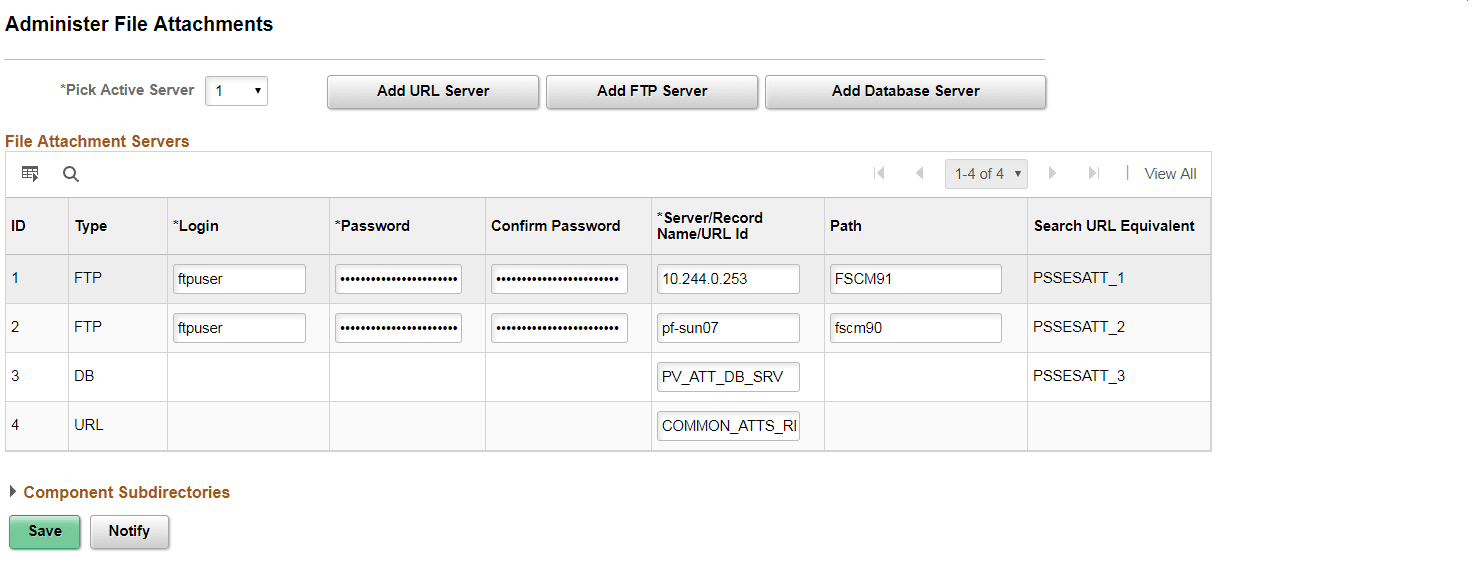
Verify that the attachment URL IDs defined in the File Attachment Architecture (Search URL Equivalent column), as shown in the following example, appear on this list:
Figure 4-2 Verify Attachment URL IDs
Note:
The file attachment architecture may change based on the environment you are using. It may not be same as shown in the example above.
If URL IDs are missing, add those.
See the task “Upgrading File Attachments” for instructions to add URL IDs and for information on File Attachment Architecture.
Note:
The Attachments URLIDs list is used by the Search Framework to know which attachments will be available to Search Framework.