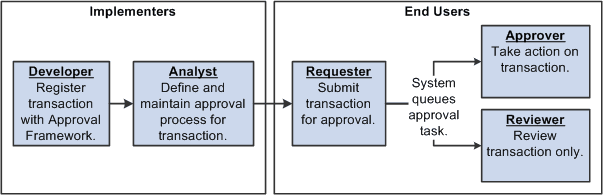
Approvals Business Process Flow
Within the approvals business process flow:
-
Application developers register information with the Approval Framework by using the Register Transactions page, where they register an application with the engine and describe its components, event handler, and records.
As part of defining the registry, application developers create a record and table in which to store cross-reference information and set up notification templates for events. This definition determines the pending approval workflow process and tells an application which transaction is being approved or denied. Application developers also link the transaction component.
Note:
PeopleSoft Human Resources delivers many transactions that are registered with the Approval Framework. Do not modify these transaction registry definitions because the system requires their setup to be as delivered. For a complete list of delivered transaction registry definitions, access the Register Transactions component by navigating to
-
Functional business analysts define the approval process definition for an application transaction.
The approval process definition includes setting up approval stages, paths, steps, recipients, and notifications for each approval process ID. Analysts identify the approval transaction registry entry on which to base approval process definitions and then define the details of the process.
Functional business analysts also define or review user list definitions, email template definitions, and transaction configuration settings.
After completing the setup, functional business analysts are responsible for maintaining and troubleshooting approval process transactions.
-
Requesters submit a transaction for approval.
This action launches the approval process. The Approval Framework reads the approval process definition and queues the transaction for approvers.
-
The system queues an approval task to an approver or reviewer using email notification, Worklist entry, or both.
The URL encoded in the Worklist entry points to the corresponding approval component.
-
Approvers take actions on transactions.
They can approve or deny requests, monitor transaction statuses, and audit approvals. When an error or violation of criteria or rules occurs during the approval process, the system notifies the approvals administrator, who interacts to resolve the issue.
-
Reviewers view the transaction.
This diagram details the business process flow of implementing and using approvals functionality. It shows tasks that application developers, business analysts, and end users perform in conjunction with approval workflow.