Defining Business Unit HR Defaults
When users access an HCM component, the system populates some of the fields, such as business unit, company, and country using the values you associated with the user's primary permission list. You can also associate default values with set IDs on the Business Unit Options Defaults page (BUS_UNIT_OPT_HR).
Using the tableset controls and business unit default options you set up, the system determines the default values to enter in select fields on the transaction component. The system uses these defaults only on components where the system identifies the business unit field as a source for default values.
To set up business unit defaulting:
-
On the Tableset Control – Record Group page (SET_CNTRL_TABLE1), select the set ID that controls business unit defaulting for this business unit.
This enables you to share defaulting rules across business units.
-
Enter the set ID's default values on the Business Unit Options Defaults component.
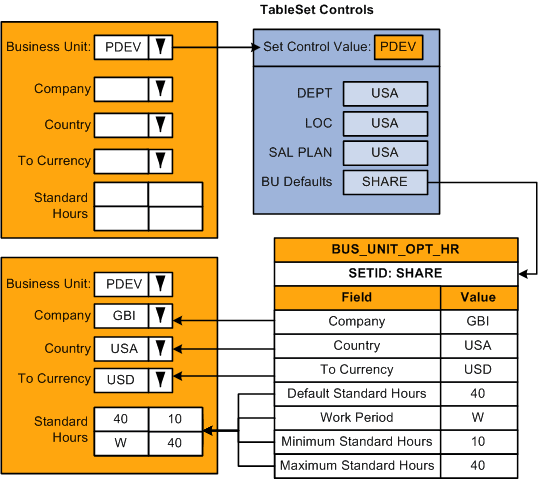
When a user accesses a component, which is driven by business unit defaulting, and selects a business unit, the system determines which set ID drives defaulting for that business unit by referencing the record group BU Defaults on Tableset Control table. For example, for business unit PDEV, the set ID for the record group BU Defaults row is SHARE. The system references the Business Unit Options Defaults component for set ID SHARE to retrieve the default values and then enters those values in the transaction component, as this diagram illustrates:
Note:
The record group containing the Business Units Options Default record (BUS_UNIT_OPT_HR) is HR_06.
Setting up business unit defaults on the Business Unit Options Defaults page makes sense when you have multiple business units that share the same kind of defaults; but shared defaults are not readily organized by permission list but rather set ID.