Entering Alternate Character Information
On pages on the global menus in PeopleSoft Human Resources, you can access the alternate character fields for proper noun fields like Name, City, and Company Description. To access these fields, click the Alternate Character button that appears to the right of a field that has a corresponding Alternate Character field available.
Note:
(CHN), (HKG) and (JPN) On the Name page, when the Format for Country is CHN, HKG or JPN, the Name and the Alternate Character Name fields appear on the page: You can enter information in both fields directly on the Name page. On the Address page, click a button to access the alternate character secondary page. Whether the Alternate Character button appears on the Address page depends on the user ID's permission list and whether the particular page has Alternate Character functionality.
(CHN) When the Format for Country is CHN, the First Name and Last Name fields have values with alphanumeric characters, and you leave Alternate Character Name blank, the system populates Alternate Character Name using Last Name, space delimiter, and First Name. Please note that this functionality works only if Alternate Character Name has no existing value.
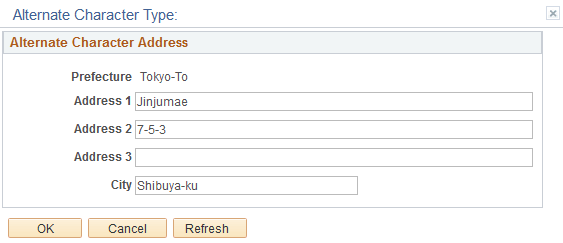
If you click the Alternate Character Address button in the Address History secondary page (ADDR_HISTORY_SEC), the system opens the Alternate Character Address page, such as the example that follows, where you can enter any proper noun information, such as street and city, in the designated alternate character set.
This example illustrates the an example of an Alternate Character Type page.
Note:
If you sign in to the application using a language for which you specified an alternate character type, the system displays that character type in the title bar of the Alternate Character Type page. In the example above, Alphanumeric is the alternate character type defined for English.
Once you enter alternate character information into an alternate character field and click OK to close the page, the system changes the appearance of the Alternate Character button on the page to indicate that alternate character information is available for the primary proper noun field on the main page.