Generating Form Letters with PeopleSoft Process Scheduler
PeopleSoft Process Scheduler uses Microsoft Word to run the macros that merge the data extract files into form letter templates and prints the letters. You can run a job that performs each step in sequence or you can manually run each process in turn. If you manually run each process, you must perform the steps sequentially (first the SQR and then its corresponding macro) because PeopleSoft Process Scheduler can't call up the report writer and the word processor simultaneously. Also, the data extract file that is created by the SQR must exist before the Word macro starts.
This diagram and the steps below illustrate how PeopleSoft Process Scheduler generates form letters for other PeopleSoft HCM applications:
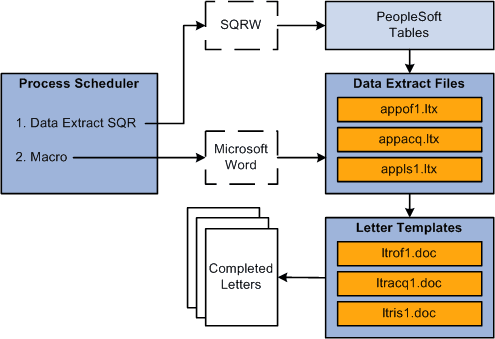
PeopleSoft Process Scheduler follows these steps to generate form letters for other PeopleSoft HCM applications:
-
SQR PAWRL01:
-
Scans the personal data record of each employee.
-
Retrieves the information from the record.
-
Creates data extract files pastdext.dat in the TEMP directory that is defined in the macro.
-
-
The macro PAWRL01:
-
Opens the form letter templates that correspond to the data extract files.
-
Merges the appropriate extract file data into the template rollover.doc.
-
Inserts the data from pastdext.dat into the template field codes.
-