Steps for a Mass Update Run
To process mass updates:
-
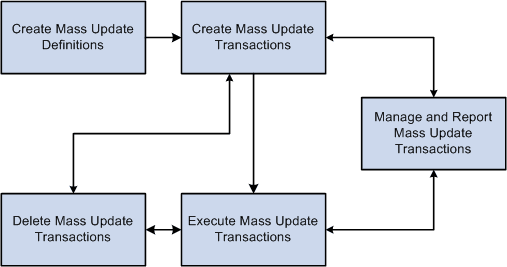
Set up a mass update definition through the Define Mass Update component.
-
Run the mass-update selection phase and create transactions for mass update through the Create Mass Updates page (which is part of the Mass Update Manager module.)
-
Review and update transactions.
You can review and update transactions online through the Manage Mass Updates component.
You can also generate a report to review transactions from the Report Mass Updates page.
Both components are part of the Mass Update Manager module.
-
Process transactions using the Transaction Processor.
You can process transactions one at a time from the Manage Mass Updates component, which is part of the Mass Update manager module.
Or you can process transactions in batch through the Execute Mass Updates page, which is part of the Execution Manager module.
-
(Optional) If necessary, cancel transactions through the Manage Mass Updates component, which is part of the Mass Update Manager.
-
(Optional) If necessary, delete transactions one at a time through the Manage Mass Updates component, or delete transactions in batch through the Delete Mass Updates page.
Both components are part of the Mass Update Manager module.
The following diagram illustrates this process flow of mass update processing: