Understanding Tablesets
To work with tablesets, you need to be able to distinguish between tablesets, set IDs, and tableset sharing:
| Term | Definition |
|---|---|
|
tableset |
A set of data rows in a control table that is identified by the same high-level key. |
|
set ID |
The high-level key that identifies a set of data rows. There are two types of set IDs:
|
|
tableset sharing |
Sharing rows of data in a tableset across business units or limiting rows to a single business unit. |
Note:
The terms tableset and set ID are sometimes used interchangeably. In many cases, this is correct, but it can cause some confusion.
You can define as many tablesets as you like, but the more you create, the more complex tableset sharing becomes. Some organizations need only one tableset.
Note:
For PeopleSoft HCM, you must create at least one tableset and set ID.
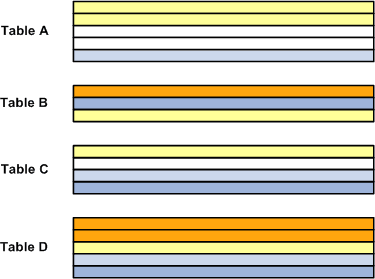
Since you use set IDs to distinguish sets of rows in a table, you will always have the same number of set IDs as you have tablesets. For example, the following diagram shows four control tables. Each color within the table represents a set ID, and all rows with the same color represent a tableset. Tables A and B are made up of three tablesets each, and tables C and D consist of four different tablesets, but there is a total of five set IDs, or tablesets, between the four tables:
PeopleSoft Human Resources control tables that are keyed according to set ID include the:
-
Location component.
-
Department component.
-
Salary Plan component.
-
Job Code component.
Tableset Sharing
Tableset sharing enables you to share some or all of your control table data from business unit to business unit, instead of having to enter the same data multiple times. The key to sharing that information is determining which rows of data can be shared across business units, which should be shared across some business units but not others, and which should be restricted.
For example, you can centralize redundant information such as country codes in a set ID that is shared while keeping information such as departments and job codes decentralized amongst different set IDs. The goal of tableset sharing is to minimize data redundancy, maintain data consistency, and reduce system maintenance tasks.
Tablesets form the building blocks of your HCM system. You populate the individual tables in the tableset according to your particular business rules or processing options. You can also mix and match tablesets by updating tableset assignments for a business unit using the TableSet Control component (SETID_TABLE).
You aren't required to share all tables in a tableset. With PeopleSoft HCM, you can share any combination of tables with any number of business units, according to your needs. Use the TableSet Control page to identify which data should be shared and how it should be shared for each business unit.
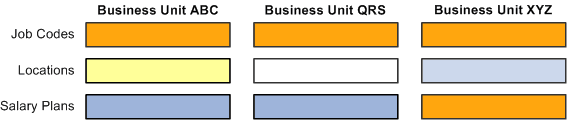
This diagram shows how one tableset is shared across all three business units in an organization for one group of records, the job code records, and for another group of records, the location records, each business unit uses it's own set ID. For the third group of records, salary plans, one table set is shared between two business units, ABC and QRS, but the third business unit, XYZ, uses the values created under another set ID:
Record Groups and Tableset Sharing
For the purpose of tableset sharing, control tables are divided into record groups. A record group is a set of control tables and views that use the same group of set IDs in the same manner.
Record groups serve two purposes:
-
They save time by enabling you to set up tableset sharing without an enormous amount of redundant data entry.
-
They act as a safety net by ensuring that tableset sharing is applied consistently across all related tables and views in your system.
A record group can contain a single table or many tables and views. You can update or modify which tables and views are included in each record group by using the Record Group component.
Business Units and set IDs
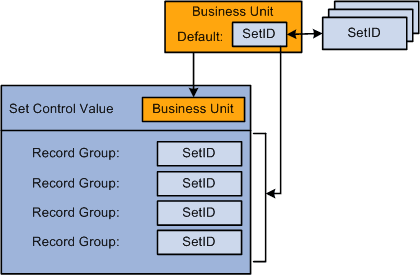
When you create a business unit, you must assign to it a default set ID. You have two options:
-
If you want to create rows of data in the control tables that should be used only by this new business unit, create a set ID for the business unit when you create the business unit.
You can create a set ID at the time you create a business unit by accepting the business unit code in the Set ID field. When you do this, the system creates a record set ID on the TableSet IDs component when you save the business unit.
Note:
This is the best option if you are only using one business unit.
-
If you want the business unit to share rows of table data (tableset sharing) with other business units, select the existing set ID that is or will be associated with the data rows you want to make available to this business unit.
Regardless of which option you choose, when you save the business unit the system creates an entry in the Tableset Control component for that business unit and associates with each record group the default set ID you selected for the business unit. You can change the set ID assignment in the TableSet Control component.
This diagram shows the relationship between set IDs and business units and illustrates the information the system creates for the business unit in the TableSet Control component where you can change some or all of the set ID assignments: