Workforce Administrator Homepage
Use the Workforce Administrator homepage to access a variety of workforce administration transactions. The cref for this homepage is HC_HR_WORKFORCE_ADMIN_FLU_GBL.
Navigation:
The default homepage title appears at the top of the homepage when you first sign in. If the Workforce Administrator homepage is not your default homepage, tap the title of the default homepage and select Workforce Administrator from the list that appears. Action buttons, which appear on the page banner when viewed with a laptop or tablet, are available in the actions list when viewed with a smartphone.
This example illustrates the Workforce Administrator homepage.
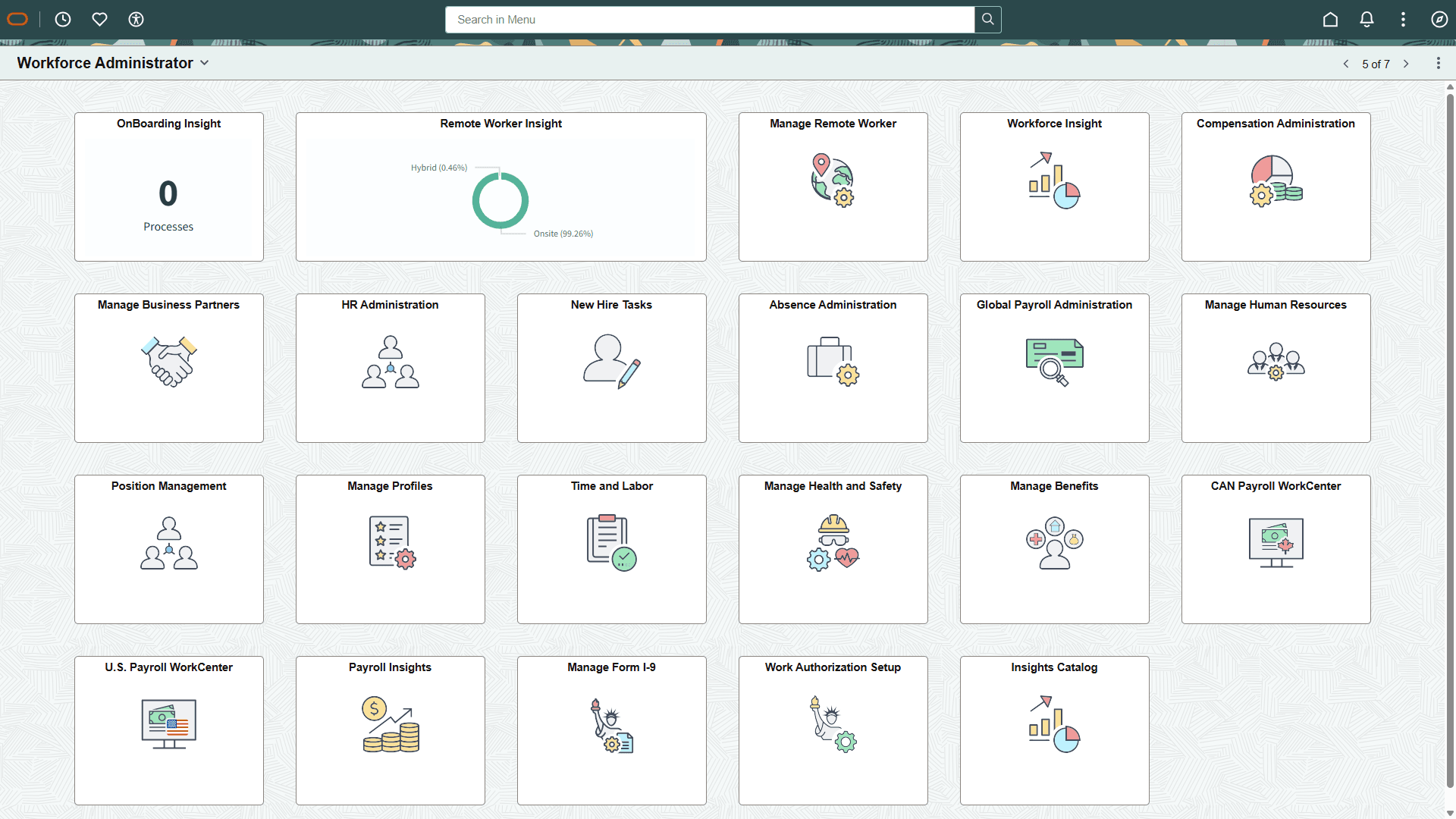
PeopleSoft HCM Tiles on the Workforce Administrator Homepage
The following table describes the tiles on the delivered Workforce Administrator homepage. The table also identifies navigation paths to equivalent classic pages. These are the menu paths that are replaced by fluid navigation paths due to Fluid Transactions and Conditional Navigation when the user is in fluid mode.
Tiles are listed in alphabetical order. On the homepage, users can personalize the tile order.
Use the links in the table to access complete documentation for each transaction.
Note:
The Time and Labor and Profile Administration tiles are not supported on small form factor devices.
| Tile Name | Description | Navigation to Equivalent Classic Pages |
|---|---|---|
|
Provides quick access to a variety of frequently-used Absence Management administrative components. |
None |
|
|
PeopleSoft Payroll for North America: CAN Payroll WorkCenter Tile |
Provides quick access to a variety of payroll-related administrative components for Canada. |
|
|
PeopleSoft eCompensation Manager Desktop: Compensation Administration Tile |
Provides quick access to a variety of compensation-related administrative components. |
None |
|
PeopleSoft Global Payroll: Global Payroll Administration Tile |
Provides quick access to a variety of frequently-used Global Payroll administrative components. |
None |
|
PeopleSoft Human Resources Administer Workforce: HR Administration Tile |
Provides quick access to a variety of frequently-used Human Resources administrative components. |
None |
|
Grants access to a collection of HCM Insights dashboards. |
None |
|
|
Provides quick access to Manage Benefits Dashboard where you can access a variety of configuration and administrative components for Benefits business process. |
None |
|
|
PeopleSoft Human Resources Administer Workforce: Manage Business Partners Tile |
Provides quick access to a variety of frequently-used administrative components used to create business partner teams. |
None |
|
PeopleSoft Human Resources Administer Workforce: Manage Form I-9 Tile |
Gives administrators access to the Manage Form I-9 component for the USA to view their own, employee, and delegated I-9 tasks that are in progress or completed. |
None |
|
PeopleSoft Human Resources Monitor Health and Safety: Manage Health and Safety Tile |
Provides quick access to a variety of setup and administrative components for the Monitor Health and Safety business process. |
None |
|
PeopleSoft Human Resources Administer Workforce: Manage Human Resources Tile |
Gives access to the Manage Human Resources dashboard where you can access a variety of configuration and administrative components for adding and maintaining person and job workforce information using fluid. Note: This tile can be added to the Administer Workforce homepage through personalizations. |
None |
|
PeopleSoft Human Resources Administer Workforce: New Hire Tasks Tile |
Provides quick access to a variety of components that are used to administrate new hires. |
None |
|
PeopleSoft Human Resources Administer Workforce: OnBoarding Insight Tile (for Administrators) |
Grants access to view OnBoarding Insight analytics as an administrator. |
None |
|
Provides access to Insights Payroll Cost, Operations, and Trends Analytics. |
None |
|
|
PeopleSoft Human Resources Manage Positions: Position Management Tile |
Grants access to the Position Management dashboard where you can set up or view summaries of Position Management data. |
|
|
PeopleSoft Human Resources Manage Profiles: Manage Profiles Tile |
Provides quick access to a variety of administrative components used for the Profile Administration business process. |
|
|
PeopleSoft Human Resources Administer Workforce: Manage Remote Worker Tile (for Administrators) |
Enables you to enter and review remote worker requests for the workforce using fluid pages. |
None |
|
Access the Tuition Reimbursement pages to create or review a tuition pre-approval or reimbursement request for an employee. |
None |
|
|
PeopleSoft Human Resources Administer Workforce: Remote Worker Insight Tile (for Administrators) |
Enables you to access and view HR remote workforce analytics as an administrator. |
None |
|
Enables you to access the Time and Labor WorkCenter with one click. |
|
|
|
PeopleSoft Payroll for North America: U.S. Payroll WorkCenter Tile |
Provides quick access to a variety of payroll-related administrative components for USA. |
|
|
PeopleSoft Human Resources Administer Workforce: Work Authorization Setup Tile |
Allows you to configure settings for the I-9 form for the United States. |
None |
|
PeopleSoft Human Resources Administer Workforce: Workforce Insight Tile |
Grants access to a collection of frequently-used analytic reports for workforce administration. |
None |