The Data Reporting Process
Using the report data generation process, you can easily read absence results tables and use this data to populate your own reports.
The report data generation process enables you to create reports that contain:
-
Retroactivity.
-
Segmentation, retro-segmentation, and segmentation cancelled by retroactivity.
-
Reverse calculations.
-
Absence Management status, indicators, and other technical fields.
-
Pay group, pay entity, and payment key changes resulting from corrective retroactivity.
-
Calculation results stored in earnings, deductions, balance accumulators, accumulators stored with each calculation, absence daily data, generated positive input, supporting elements stored with each calculation, and specific result tables (writable arrays).
-
Multiple selections by process run.
-
Data based on a calendar group or a period of time.
-
Results from finalized and unfinalized calendars.
-
Payees selected from any table at the EMPLID level, adhering to HCM security.
-
Appropriate absence segments.
-
Selected elements.
-
Any and all slices.
Steps for Creating Reports Using the Report Data Generation process
To create reports using the report data generation process:
-
Assign output and input tables for the report on the Define Report Data page.
-
Define the rules used to create the output table on the Define Report Data page.
-
Map fields and create filters used to generate the output table on the Report Data Process Details page.
Selecting Absence Results and Populating Output Tables
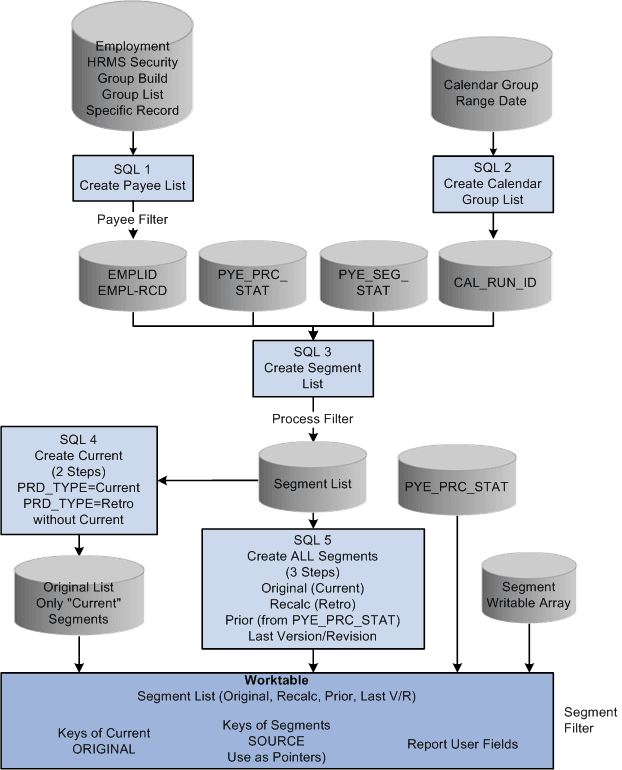
After you set up the input and output table details using the Define Report Data page, and map fields and define filters on the Report Data Process Details page, the system completes the following steps to select the absence results and populate the output tables:
-
Select calendar groups.
-
Select eligible payees using payee lists, group builds, security, and payee filter. If a payee filter was created, it is applied here.
-
Join the payee process status table (GP_PYE_PRC_STAT) and the payee segment status table (GP_PYE_SEG_STAT).
-
Select the original segments. If a process filter was created it is applied here.
-
Insert the original, recalc, prior, and last version/revision segments into the worktable (GP_RPTW_TMP). The worktable now contains rows by payee for selected segments, recalculations, prior segments, and last version/revision segments. If a segment filter was created it is applied here.
-
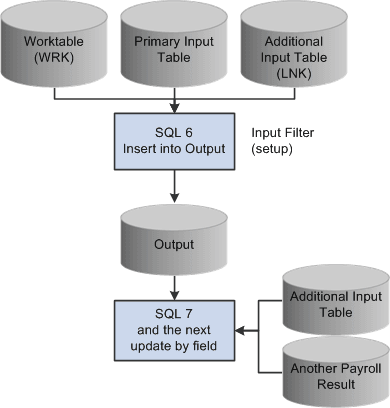
Join the worktable, the primary input table, and the link table (the additional input table joined with the primary input table) according to the data on the Report Data Process Details page. The results are posted to the output table. Only the results derived from the worktable or the primary input table are populated. If an input filter was created it is applied here.
-
Update the output table with data from the additional input tables.
This diagram illustrates how the system generates the report data Worktable.
This diagram illustrates how the system combines the data in the Worktable with the data from the Primary Input Table and Additional Input Table in the process of generating report data.