Payee Calendar Groups Page
Use the Payee Calendar Groups page (GP_PYE_RUN) to select the calendars for which to enter special processing instructions for a payee.
Navigation:
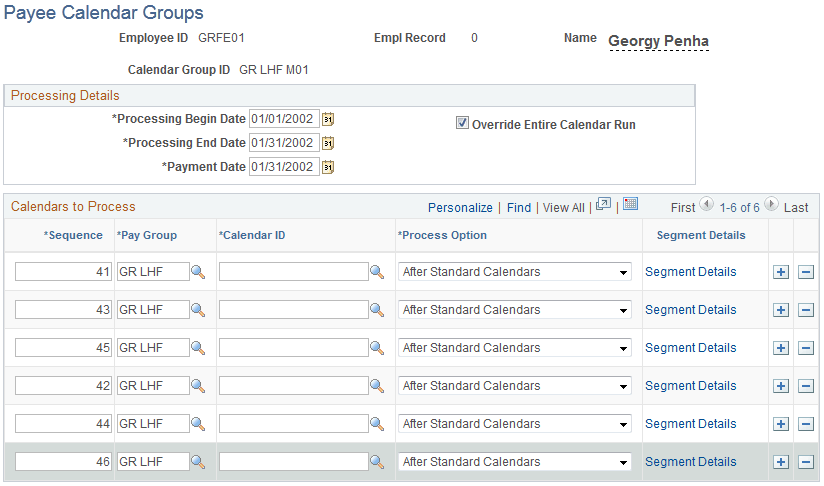
This example illustrates the fields and controls on the Payee Calendar Groups page.
| Field or Control | Description |
|---|---|
|
Processing Begin Date, Processing End Date, and Payment Date |
Enter processing begin and end dates, and a payment date. These fields apply to processing effective-dated elements whose definition as of date (defined on the Element Name page) is set to Process Begin Date, Process End Date, or Payment Date. The dates determine which effective-dated rules (element definitions) to use for these elements and which period's accumulators to update for the elements. Say that the definition as of date for an entitlement element is set to Process End Date. When the system encounters the element during the batch process, it retrieves the element definition that was in effect on the date entered in the Processing End Date field. The system also updates the accumulators for the period in which the processing begin date or the processing end date falls. |
|
Override Entire Calendar Run |
Select to have the system process only calendars or segments that you designate for processing in the Calendars to Process group box or on the Segment Details page. If you do not select this check box, the system processes the calendars that you want to override (those listed in the Calendars to Process group box), plus any other calendars that are included in the calendar group. |
Calendars to Process
In this group box, select the calendars for which you want to specify special processing instructions for the payee.
| Field or Control | Description |
|---|---|
|
Sequence |
Enter a number that determines the calendar processing order. |
|
Pay Group |
Enter the pay group that's associated with the calendar to be overridden. |
|
Calendar ID |
Enter the calendar to override. |
|
Process Option |
Applies only if the Override Entire Calendar Run check box is not selected (that is, you are overriding selected calendars only). Select the process option to determine whether the system is to process the calendars that have override instructions before or after all other calendars in the calendar group. Values are: Before Standard Calendars, After Standard Calendars, and Not Applicable. |
|
Segment Details |
Click this link to access the Segment Details page. |