Process Status and Option Preparation
During option preparation, the system uses eligibility and event rules to determine:
-
Plan eligibility.
-
Plan pricing.
-
Available options.
-
Default options.
-
Proof of coverage limits for life and AD/D plans.
-
Coverage terminations (as appropriate).
Any processing errors during this phase are typically caused by problems with:
-
Eligibility rules.
-
Event rules.
-
The benefit program involved.
-
The participant's HR information.
When an error occurs, you need to:
-
Evaluate the error.
-
Correct it.
-
Reprocess the event.
This table describes option preparation status values:
| Process Status | Description | Next Processing Steps |
|---|---|---|
|
FA - Finalized - Benefit Program None |
Participant event has no program assignment and no current elections. Used for events assigned an AN process status during the Scheduling and Program Assignment and for which associated participants do not have current benefit elections. |
No further processing occurs for this event. The online page description for this process status (on the Schedule Summary page, for example) is Program None. |
|
FP - Finalized - Prepared None |
System has assigned the participant event to a benefit program, but the associated participant is not allowed to elect any new options. |
No further processing occurs for this participant event. The online page description for this process status (on the Schedule Summary page, for example) is Prepare None. |
|
PE - Prepare Error |
The system has encountered an error. Events are given a PE process status during option eligibility determination or calculation of credits. |
To correct, you should make corrections to the personal, employment, job, and information of the associated participant or to plan and option eligibility information. Each time you run the Benefits Administration process, the system reevaluates PE events. |
|
PR - Prepared |
The system has calculated eligible options, credits, rates, and proof requirements for the participant associated with the event, and current elections have been identified for proof, eligibility level, and default processing. AN events that have current elections can also be brought to a status of PR. |
For PE or AS events, processing stops. Enrollment forms should be created for and delivered to the participant associated with the event to bring the event to a process status of NT (notified). For AN events, processing also stops. Review the event (a pending termination of benefits), confirm it by marking it for finalization, and then run the second phase of Benefits Administration. The event is brought to a process status of ET (Entered). The system brings the event to a process status of FE (Finalized - Enrolled) and automatically inserts termination rows for each of the associated participant's current elections. |
|
NT - Notified |
Election enrollment form has been distributed to the participant associated with the event. The system updates the event's process status to NT when you generate election forms for that participant through report BAS004. Participants can advance to NT only if their previous process status was PR. |
Participants need to complete their election forms and return them to the HR/Benefits department. When you enter the elections into the system with the data entry pages, the system advances the events to an ET (entered) process status. |
Note:
If you run an Open Enrollment process with Finalize selected, NT and PR events are brought to FE status, and the system follows event rules to determine whether current elections or defaults should be loaded into the associated participant's records.
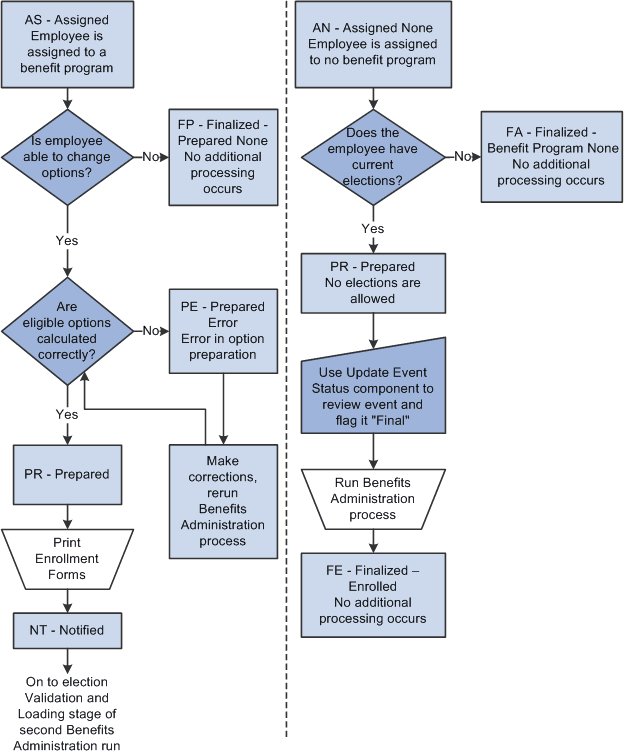
The following two flowcharts illustrate how the system assigns process status values during option preparation. The flowchart on the left shows the process status flow for AS events, while the flowchart on the right shows the process status flow for AN events:
The following image illustrates the process status flow for option preparation.