The Approval Before Employee Review (Apvl Before Review) Process - 5-Step
This diagram illustrates the 5-step Approval Before Employee Review process flow:
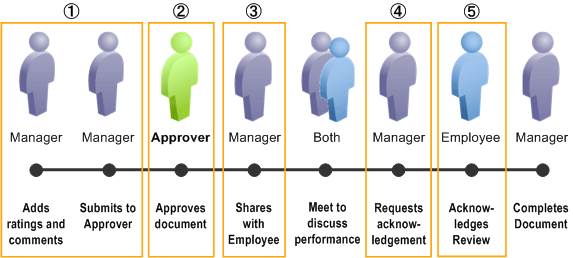
This table describes the flow of the process, lists the availability of action buttons that appear in the manager and employee evaluations for the process, and the change of statuses during the process:
| Action | Available Action Button | Document Status |
|---|---|---|
|
1. Manager adds ratings and comments to the document. When finished, manager clicks the Submit for Approval button to submit the document for approval. Manager confirms the action. |
Submit for Approval |
(original) Evaluation in Progress (changed to) Approval - Submitted |
|
2. Individual in the approval chain approves the document. System changes document status accordingly. Note: If the email approval transaction for performance documents is enabled, the system sends approvers email messages from which they can approve or deny the document. |
- |
(changed to) Approval - Approved |
|
3. Manager opens the approved document and clicks the Share with Employee button to share the document with the employee. Manager confirms the action. |
Share with Employee |
(changed to) Shared with Employee |
|
4. Manager and employee meet to discuss the document. Next, manager clicks the Request Acknowledgement button to ask the employee to acknowledge that they have discussed the evaluation. Manager confirms the action. |
Request Acknowledgement |
(changed to) Pending Acknowledgement |
|
5. Then, one of these two things happens:
Employee (or manager) confirms the action. System, if applicable, records the individual’s eSignature. See Also Manager and Employee Signatures for the eSignature Section |
(for employee) Acknowledge (for manager) Override Acknowledgement |
(changed to) Acknowledged |
|
Manager clicks the Complete button to finish the review. Manager confirms the action. System changes the document status to Completed. It also, if applicable, records the manager's eSignature. See Also Manager and Employee Signatures for the eSignature Section |
Complete |
(changed to) Completed |
Note:
If approval is denied, the document status changes to Evaluation In Progress in the manager evaluation. The system displays a message on the evaluation, stating that approval has been denied for the document. The manager needs to update the document as necessary, and submit it for approval again.