Career Planning Pagelet
The Career Planning pagelet displays career paths for the employee.
This example illustrates the fields and controls on the Career Planning pagelet. You can find definitions for the fields and controls later on this page.
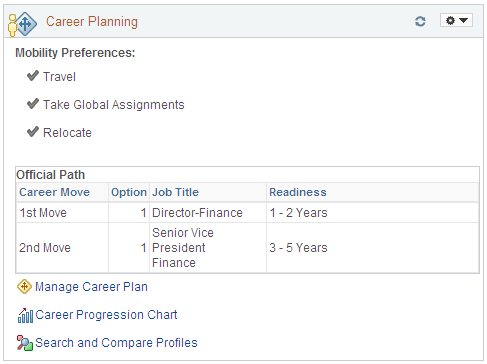
Use this pagelet to view the mobility preferences for an employee. The pagelet may also display up to 3 grids to view the employee’s different types of career paths: the Official Path, the Manager Approved Path, and the Personal Path, if applicable. The grids will appear only when there is data to display. The Personal Path grid will appear only if it has data to display and if the employee has not marked the personal career path as private.
| Field or Control | Description |
|---|---|
|
Willing To |
Display the mobility preferences for this employee. Mobility preferences are maintained in the person’s profile. The check mark indicates an employee is willing to relocate, travel, or take an international assignment for his or her job. |
|
Career Move |
Identifies the order of career steps. For example, 1st Move is the first step in the suggested career path. |
|
Option |
Displays the preference order of jobs when more than one job is associated with a career move. |
|
Job Title |
Identifies the suggested job for an employee’s career progression. |
|
Readiness |
Displays when this employee is or will be ready for this career move. Values are: 1-2 Yrs, 3-5 Yrs, Emergency, Ready Now, and Retirement. |
|
|
Click this link to open the Manage Careen Plan component and manage career information for this employee. |
|
|
Click this link to open the Career Progression Chart page and see a graphical representation of an employee's career path. |
|
|
Click this link to open the Search for Profiles page to perform profile comparisons between this employee and other employees or jobs within the organization. |
|
View All <number> |
Click this link when more than five rows of data appear in a grid to view additional career move options for this person. |


