PAR Defaults for Approved Transactions
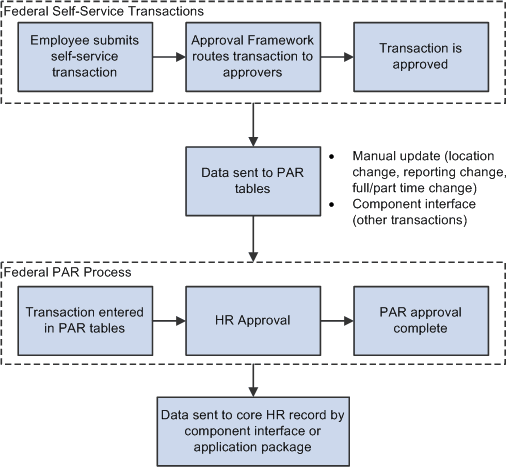
In PeopleSoft HR, the PAR system automatically routes a wide variety of requests to reviewing officials in human resources. PAR processing is separate from the Approval Framework approval process and occurs only after all Approval Framework approvals are complete.
Four of the seven manager self-service transactions are automatically transferred to the PAR system after all approvals are complete. The system uses a component interface for this transfer. To support the push to the PAR system, you must provide default values for certain fields that are required in the PAR tables and that are not normally entered by the employee who originates the self-service request. You provide these defaults in the Transaction Setup component (the same component where you associate approval steps with WIP statuses).
See PeopleSoft eProfile: Defining PAR Tracking Data, Application Fundamentals: Understanding WIP Management System Setup.
Three other transactions are position-controlled, so changes are made to the position and then propagated out to the persons in the positions. These transactions are not automatically pushed to the PAR system. Instead, the Personnelist / Federal Self Service Administrator must enter the information in the PAR system manually.
The following table shows which transactions are automatically pushed to the PAR tables and which ones require an administrator to manually enter data into the PAR tables:
| PAR Table Update Method | Transactions |
|---|---|
|
Manual (administrator) |
|
|
Automatic (component interface) |
|
This process flow diagram illustrates how self-service transactions first go through Approval Framework approvals, then get sent to federal PAR processing before any data changes are made to core HR tables: