Performance History Pagelet as a Graph
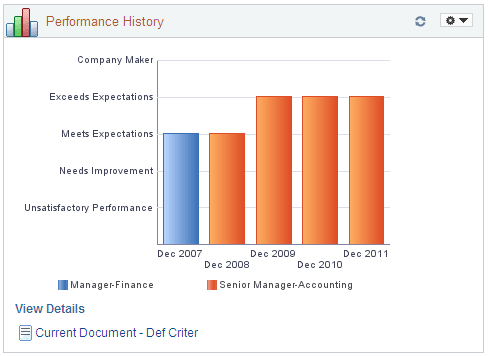
This Performance History pagelet displays the overall rating (y-axis) for an employee from past performance periods (x-axis) using a bar graph.
This example illustrates the fields and controls on the Performance History pagelet in graphical format. You can find definitions for the fields and controls later on this page.
We recommend that you use the graphical view when the rating model has not changed over performance periods.
This pagelet displays a bar graph. The colored vertical bars represent the employee’s overall performance rating for the period specified. Each distinct job title is represented by a different colored bar. A legend for each job title appears below the graph. The administrator determines the document type and how many periods worth of data to show on the Talent Summary Setup - Other Pagelets page.
See Other Pagelets Page.
Pause over a period rating bar to view the performance dates and employee rating. Click the bar to open the Document Details page to see additional details about the rating for this employee and access the performance evaluation.
| Field or Control | Description |
|---|---|
|
View Details |
Click this link to view the performance history in a grid format. |
|
|
Click this link to view or manage the most current performance evaluation that is in progress in WorkCenter. |
