Scheduling for Any Period
You control the payment of an earnings element—whatever the pay frequency—by assigning one of seven generation controls to the earnings. Five generation controls exist for periods 1 to 5 (there is a maximum of five weekly periods per month), and two additional generation controls cover two periods each (periods 1 and 3 and periods 2 and 4).
The two-period controls have the system process the earnings in both covered periods. For example, the control for periods 1 and 3 affects weekly pay runs in weeks 1 and 3 but not weeks 2, 4, and 5.
A corresponding formula exists for each generation control. When the formula returns True, the earning is paid.
For example, to pay an allowance for the first period of the month (period 1), the formula returns True for the first period of the month and False for the remaining periods, and the earnings element is processed.
The formula attached to each generation control has the same name except the FM element type code replaces the GC type code; for example, the generation control AUS GC PERIOD 1 has the associated formula AUS FM PERIOD 1.
Note:
For each of the two-period generation controls, the formula calls two other formulas, one for each period. For example, the formula AUS FM PRD 1+PRD 3 calls formulas AUS FM PERIOD 1 and AUS FM PERIOD 3. Only one of the two formulas needs to return True for the system to pay the earning.
Weekly, fortnightly, semimonthly, and four-weekly brackets return values depending on where the pay period end date occurs.
This diagram shows the bracket values associated with each day of the month.
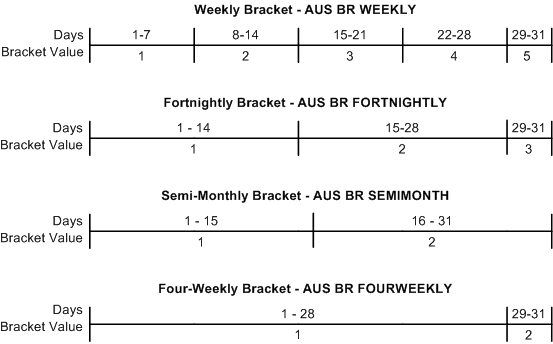
To provide examples, the following table shows the bracket value that each bracket returns for day 5 and day 27 of the month:
| Bracket | Value for Day 5 | Value for Day 27 |
|---|---|---|
|
Weekly |
1 |
4 |
|
Fortnightly |
1 |
2 |
|
Semimonthly |
1 |
2 |
|
Four-weekly |
1 |
1 |
The formula uses the bracket values, which indicate to the system whether the pay period end date is in the relevant period. The formula checks the bracket that corresponds to the frequency type.
For the period 1 formula for example:
 If AUS VR FREQ TYPE = 'W' (weekly) Then
 			  If AUS BR WEEKLY = 1 Then...TRUE
 If AUS VR FREQ TYPE = 'B' (biweekly or fortnightly)Then
			  If AUS BR FORTNIGHLY = 1 Then...TRUE
The formula returns True when the pay period end date is in the bracket value that corresponds to the period. That is, for period 2 when the bracket for a frequency type returns 2, the formula returns True.
For example, to have the earning paid in the first period, you attach the period 1 generation control to the earnings element. If generation control formula for period 1 returns the bracket value 1, the formula returns True—regardless of the frequency specified in variable AUS VR FREQ TYPE, .
If you want the earning paid in the second and fourth periods, attach the AUS GC PRD 2 +PRD4 AUS FM PRD 2 +PRD4
The following table lists the frequencies for which each formula uses the bracket value (W is weekly, B is fortnightly, S is semimonthly, F is four-weekly, and M is monthly):
| Formula | Frequency | Comment |
|---|---|---|
|
AUS FM PERIOD 1 |
W, B, S, F, M |
N/A |
|
AUS FM PERIOD 2 |
W, B, S, F |
M is always true |
|
AUS FM PERIOD 3 |
W, B |
S, F, and M are always true |
|
AUS FM PERIOD 4 |
W |
B, S, F, and M are always true |
|
AUS FM PERIOD 5 |
W |
B, S, F, and M are always true |
Note:
None of the delivered earnings elements use the AUS GC PERIOD <number> generation controls; however, you can use these controls for deductions just as you use them for earnings. Deduction INSURANCE, for example, uses the AUS GC PERIOD 1 generation control.
Related Topics