Payslip Setup Process
This diagram illustrates the payslip setup process:
This diagram illustrates the payslip setup process.
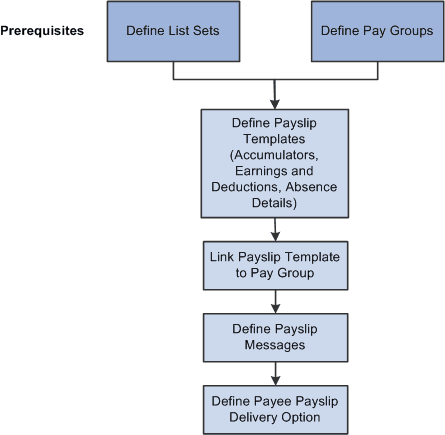
After completing the prerequisites:
-
Create and configure the payslip template for PeopleSoft Global Payroll for China on the Templates Setup & Accumulators, Earnings and Deduction, and Absence Details pages.
The template determines the layout and content of the self-service and printed payslip. It is configured to include accumulators, earnings, deductions, leave balances, and other items such as payslip delivery method, and the print order of a payslip run and the specific groups for which the payslip is to be produced.
-
Define the message or messages that will appear on the payslip for the designated calendar group on the Add Payslip Message CHN page.
-
Associate a payslip template with a particular pay group on the Payslip Template Details page.
Payslips for payees in a pay group are produced using the template that is assigned here. A payslip template can be associated with multiple pay groups. A pay group can be associated only with one payslip template; however, a template can be attached to multiple pay groups.
-
Override the payslip delivery destination option for a specific payee from the Payslip Delivery Options CHN page. (Optional)
Payslip delivery options entered here for a payee override the delivery option specified on the payslip template.